You will often see similar growth and evolution cycles across any type of online community, and the closed loop community is following this growth cycle as expected. Much like how Nightscout went from one very hard way to setup to get your CGM data in the cloud, to ultimately having dozens of DIY options and now more recently, multiple commercial options, closed looping is following similar trends. OpenAPS was the first open source option for people who wanted to DIY loop, and now there are a growing number of ways to build or run closed loops! And next year, there should be at least one commercial option publicly available in the U.S. followed by several more options in 2018 on the commercial market. Awesome! This is exactly the progress we were hoping to see, and facilitate happening more quickly, by making our work & encouraging others to make their work open source.
We’ve learned a lot (from building our own closed loop and watching others do so through OpenAPS) that we think is relevant to anyone who pursues DIY closed looping, regardless of the technology option they choose. This thought process and approach will likely also be relevant to those who switch to a closed loop commercial option in the future, so we wanted to document some of the thought process that may be involved.
Before considering closed looping, people should know:
A (hybrid or even full) closed loop is not a cure. There will be a learning curve, much like switching to a pump for the first time.
Even after you get comfortable with a closed loop, there will still sometimes be high or low BGs, because we are still dealing with insulin that peaks in 60-90 minutes; we’ll still get kinked pump sites or pooled insulin; and we’ll still have hormones that drive our BGs up and down very rapidly in ways we can’t predict, but must react to. Closed looping helps a lot, but there’s still a lot that goes into managing diabetes.
Before using a DIY closed loop, people should consider:
Identifying or creating the method to visualize their data in a way they are comfortable with, both for real-time monitoring of loop activity and retrospective monitoring. This is a key component of DIY looping.
Running in “open loop” mode, where the system provides recommendations and you spend days or weeks analyzing and comparing those recommendations to how you would calculate and choose to take action manually.
Based on watching the “open loop” suggestions, decide your safety limits: you should set max basal and bolus rates, as well as max net IOB limits where relevant. Start conservative, knowing you can change them over time as you watch and validate how a particular DIY loop works with your body and your lifestyle.
Getting started with a DIY closed loop, people should think about the following:
But even more importantly, you need to understand how it works so you can choose if you need to step in and take manual action. You should understand how it works so you can validate “this is what it should be doing” and “I am getting the output and outcomes that I would expect if I were doing this decision making manually”.
Often, people will get frustrated by diabetes and take actions that the loop then has to compensate for. Or they’ll get lax on when they meal bolus, or not enter carbs into the system, etc. You will get much better results by putting better data into the system, and also by having a better understanding of insulin timing in your body, especially at meal times. Using techniques like “eating soon mode” will dramatically help anyone, with or without a closed loop, reduce and limit severity of meal spikes. Ditto goes for having good CGM “calibration hygiene” (h/t to Pete for this phrase) and ensuring you have thought about the ramifications of automating insulin dosing based on CGM data, and how you may or may not want to loop if you doubt your CGM data. (Like “eating soon”, ‘soaking’ a CGM sensor may yield you better first day results.)
Start with higher targets for the loop than you might correct to manually.
Move first from an “open loop” mode to a “low glucose suspend” type mode first, where max net IOB is 0 and/or max basal is set at or just above your max daily scheduled basal, so it low temps to prevent and limit lows, but does not high temp above bringing net IOB back to 0.
Gradually increase max net IOB above 0 (and/or increase max basal) every few days after several days without low BGs; similarly, adjust targets down 10 points for every few days gone without experiencing low BGs.
Test basic algorithms and adjust targets and various max rates before moving on to testing advanced features. (It will be a lot easier to troubleshoot, and learn how a new feature works, if you’re not also adjusting to closed looping in its entirety).
This is our (Dana & Scott‘s) take on things to think about before and when pursuing a closed loop option. But there’s about a hundred others running around the world with closed loops, too, so if you have input to share with people that they should consider before looping, leave a comment below! And if you’re looking to DIY closed loop before a commercial solution is available, you might also be interested in checking out the OpenAPS Reference Design and some FAQs related to OpenAPS.
Tucked on the bottom of the second page of the (PDF version of the) article:
“For instance, in 2014, a woman with type 1 diabetes wired together a tiny processor, an insulin pump and a continuous glucose monitor to automate the regulation of her blood sugar levels. For a small community of patients, the collective use of such ‘home-made’ systems has resulted in improvements that are well ahead of those provided by devices and interventions emerging from conventional markets.1”
Wilbanks and Topol highlight some critical truths in their commentary, and call out another (frustrating) diabetes example to illustrate:
“Although patients can monitor their glucose levels at any instant, their aggregate records are not made accessible to them. And there is no mechanism by which patients or researchers outside the company can gain access to Medtronic’s tens of thousands of measurements.”
I’ve written about this specific example before, in fact: new ‘partnerships’ mean my personal health data is likely shared with IBM for Watson’s usage…but I don’t have access to this data or insights, and am in fact missing critical information and data visualization on my FDA-approved medical device that’s been on the market for years.
The call to action for device manufacturers, regulators, and the medical industry is simple: Give me, the patient, my data that I need so I can safely take care of myself and better manage my diabetes.
Wilbanks and Topol emphasize that this won’t happen “…unless each of us takes responsibility for our own health and disease, and for the information that we can generate about ourselves. When it comes to control over our own data, health data must be where we draw the line.”
This needs to happen everywhere, not just in diabetes. Will you join us in drawing the line?
Having used a CGM for years (and years and years, and years before that), and having chosen to build a DIY system that provides smart alerts and recommendations based on said CGM data (learn more about my #DIYPS system here) and ultimately using CGM data to build the open source closed loop system that automates insulin delivery (find out more about #OpenAPS here)…I’ve learned a few things about how to get the best data out of my sensors. Currently, I’m using Dexcom, so this applies to the Dexcom sensors.
The biggest thing I do to get better first day results from a continuous glucose monitor (CGM) sensor is to “soak” my sensors. Here’s what I mean by this:
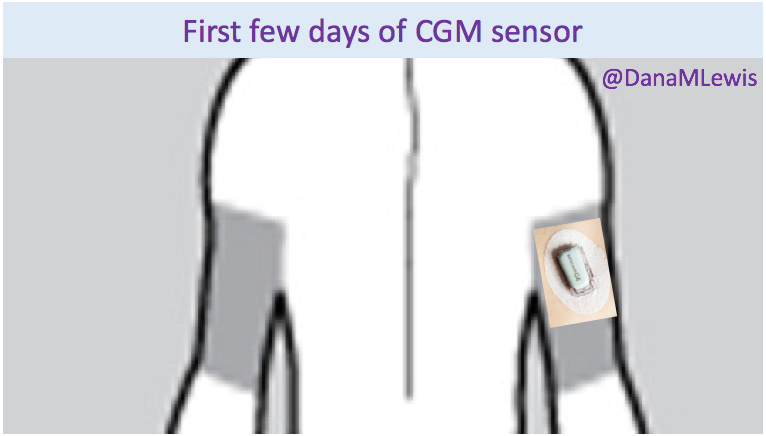
Normally, you’d expect to see a person with one CGM sensor on their body, like this:
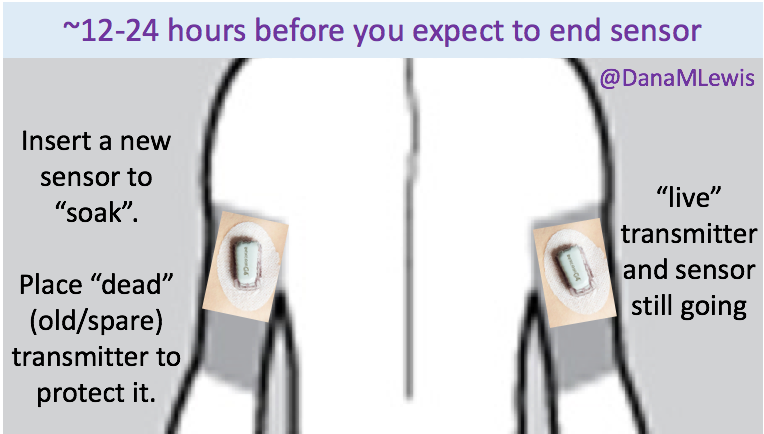
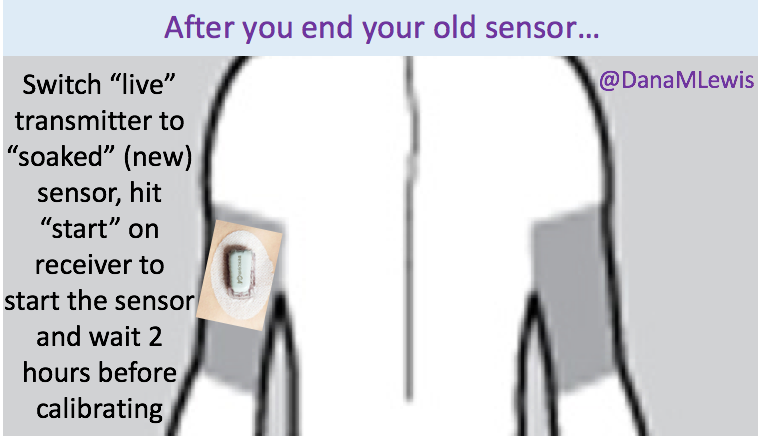
However, 12-24 hours before I expect my sensor to end, I insert my next sensor into my body. To protect the sensor (you don’t want the sensor filament itself to get torn off or lost in your body), I plop an old (“dead” battery) transmitter on it.
If you don’t have an old/dead transmitter, you could try taping over it – the goal is just to protect the sensor filament from ripping.
The next day, when my sensor session ends:
I take the “live” transmitter off the old sensor, and remove the old sensor from my body. I hit “stop sensor” on my receiver, if it hasn’t already stopped itself.
I gently remove the “dead”/old transmitter from ‘new’ sensor.
I then stick the “live” transmitter onto the new sensor.
I hit “start sensor” on my receiver.
The outcome (for me) has always been significantly improved “first day” BG readings from the sensor. This works great when you can plan ahead and your outfits (don’t judge, sometimes you have important outfits like a wedding dress to plan around) and skin real estate support two sites on your body for 24 hours or so. This doesn’t work if you rip a sensor out by accident, so in those scenarios I go ahead and put a new sensor on, put the ‘live’ transmitter on, and hit ‘start’ to get through the 2 hour calibration period as soon as possible to get back to having live data. (All the while knowing that the first day is going to be more “meh” than it would be otherwise.)
As mentioned in the previous post, we had the privilege of coming to New Orleans this past weekend for two events – #DData16 and the American Diabetes Association Scientific Sessions (#2016ADA). A few things stuck out, which I wanted to highlight here.
At #DData16:
The focus was on artificial pancreas, and there was a great panel moderated by Howard Look with several of the AP makers. I was struck by how many of them referenced or made mention of #OpenAPS or the DIY/#WeAreNotWaiting movement, and the need for industry to collaborate with the DIY community (yes).
I was also floored when someone from Dexcom referenced having read one of my older blog posts that mentioned a question of why ??? was displayed to me instead of the information about what was actually going on with my sensor. It was a great reminder to me of how important it is for us to speak up and keep sharing our experiences and help device manufacturers know what we need for current and future products, the ones we use every day to help keep us alive.
Howard DM’ed me in the middle of the day to ask if I minded going up as part of the patient panel of people with AP experiences. I wasn’t sure what the topic was, but the questions allowed us to talk about our experiences with AP (and in my case, I’ve been using a hybrid closed loop for something like 557 or so days at this point). I made several points about the need for a “plug n play” system, with modularity so I can choose the best pump, sensor, and algorithm for me – which may or may not be made all by the same company. (This is also FDA’s vision for the future, and Dr. Courtney Lias both gave a good presentation on this topic and was engaged in the event’s conversation all day!).
At #2016ADA:
There needs to be a patient research access program developed (not just by the American Diabetes Association for their future Scientific Sessions meetings, but at all scientific and academic conferences). Technology has enabled patients to make significant contributions to the medical and scientific fields, and cost and access are huge barriers to preventing this knowledge from scaling. At #2016ADA, “patient” is not even an option on the back of the registration form. Scott and I are privileged that we could potentially pay for this, but we don’t think we should have to pay ($410 for a day pass or $900 for a weekend pass) so much when we are not backed by industry or an academic organization of any sort. (As a side note, a big thank you to the many people who have a) engaged in discussion around this topic b) helped reach out to contacts at ADA to discuss this topic and c) asked about ways to contribute to the cost of us presenting this research this weekend.)
First, everything about #OpenAPS is open source. The content of our poster or any presentation is similarly open source.
Not everyone had time to come by the poster.
Not everyone has the privilege or funds to attend #2016ADA, and there’s no reason not to share this content online, especially when we will likely get more knowledge sharing as a result of doing so.
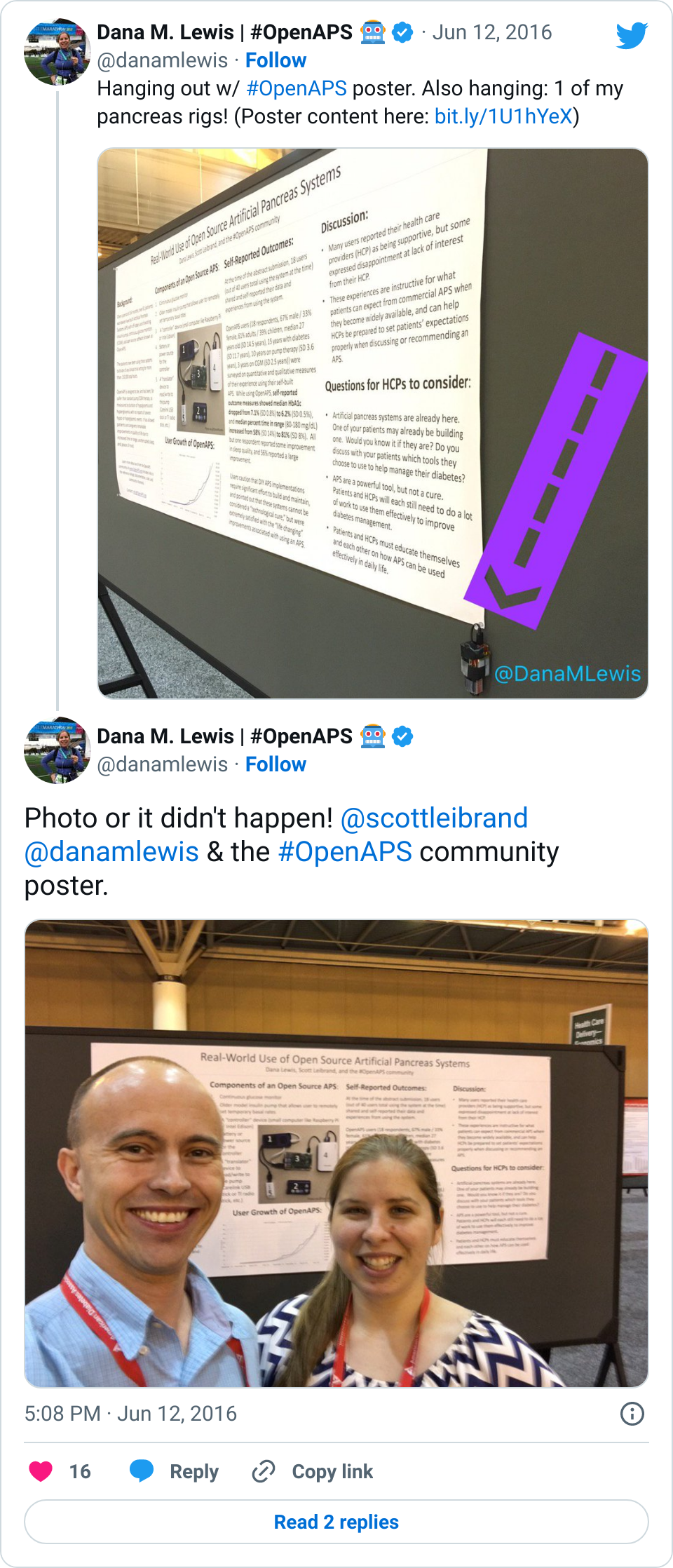
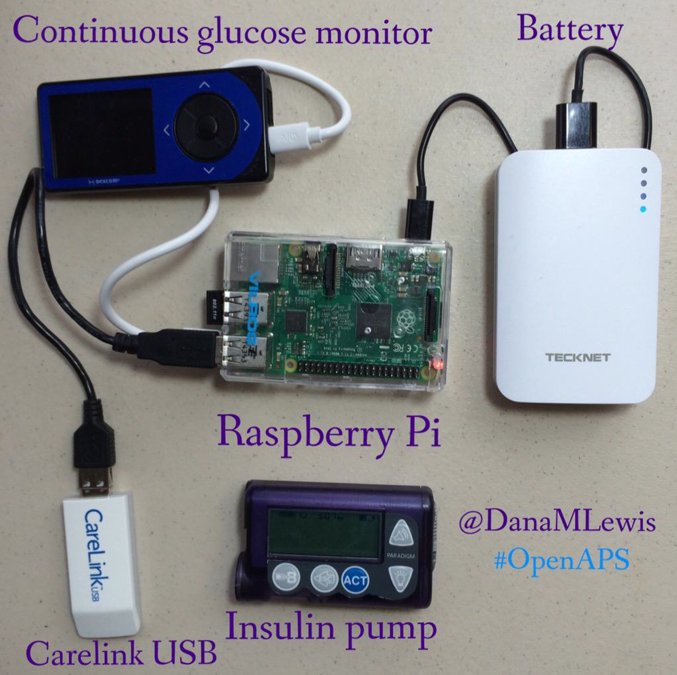
Speaking of photos, I was surprised that around half a dozen clinicians (HCPs) stopped by and made mention of having used the picture of the #OpenAPS rig and the story of #OpenAPS in one of their presentations! I am thrilled this story is spreading, and being spread even by people we haven’t had direct contact with previously! (Feel free to use this photo in presentations, too, although I’d love to hear about your presentation and see a copy of it!)
We had many amazing conversations during the poster session on Sunday. It was scheduled for two hours (12-2pm), but we ended up being there around four hours and had hundreds of fantastic dialogues. Here were some of the most common themes of conversation:
Why are patients doing this?
Here’s my why: I originally needed louder alarms, built a smart alarm system that had predictive alerts and turned into an open loop system, and ultimately realized I could close the loop.
What can we learn from the people who are DIY-ing?
How can we further study the DIY closed loop community?
This is my second favorite topic, which touches on a few things – 1) the plan to do a follow up study of the larger cohort (since we now have (n=1)*84 loopers) with a full retrospective analysis of the data rather than just self-reported outcomes, as this study used; 2) ideas around doing a comparison study between one or more of the #OpenAPS algorithms and some of the commercial or academic algorithms; 3) ideas to use some of the #OpenAPS-developed tools (like a basal tuning tool that we are planning to build) in a clinical trial to help HCPs help patients adjust more quickly and easily to pump therapy.
What other pumps will work with this? How can there be more access to this type of DIY technology?
We utilize older pumps that allow us to send temp basal commands; we would love to use a more modern pump that’s able to be purchased on the market today, and had several conversations with device manufacturers about how that might be possible; we’ll continue to have these conversations until it becomes a reality.
Scott and I walked away from this weekend with energy for new collaborations (and new contacts for clinical trial and retrospective analysis partnerships) and several ideas for the next phase of studies that we want to plan in partnership with the #OpenAPS community. (We were blown away to discover that OpenAPS advanced meal assist algorithm is considered by some experts to be one of the most advanced and aggressive algorithms in existence for managing post-meal BG, and may be more advanced than anything that has yet been tested in clinical trials.) Stay tuned for more!
It’s been a busy couple (ok, more than couple) of months since we last blogged here related to developments from #DIYPS and #OpenAPS. (For context, #DIYPS is Dana’s personal system that started as a louder alarms system and evolved into an open loop and then closed loop (background here). #OpenAPS is the open source reference design that enables anyone to build their own DIY closed loop artificial pancreas. See www.OpenAPS.org for more about that specifically.)
We’ve instead spent time spreading the word about OpenAPS in other channels (in the Wall Street Journal; on WNYC’s Only Human podcast; in a keynote at OSCON, and many other places like at the White House), further developing OpenAPS algorithms (incorporating “eating soon mode” and temporary targets in addition to building in auto-sensitivity and meal assist features), working our day jobs, traveling, and more of all of the above.
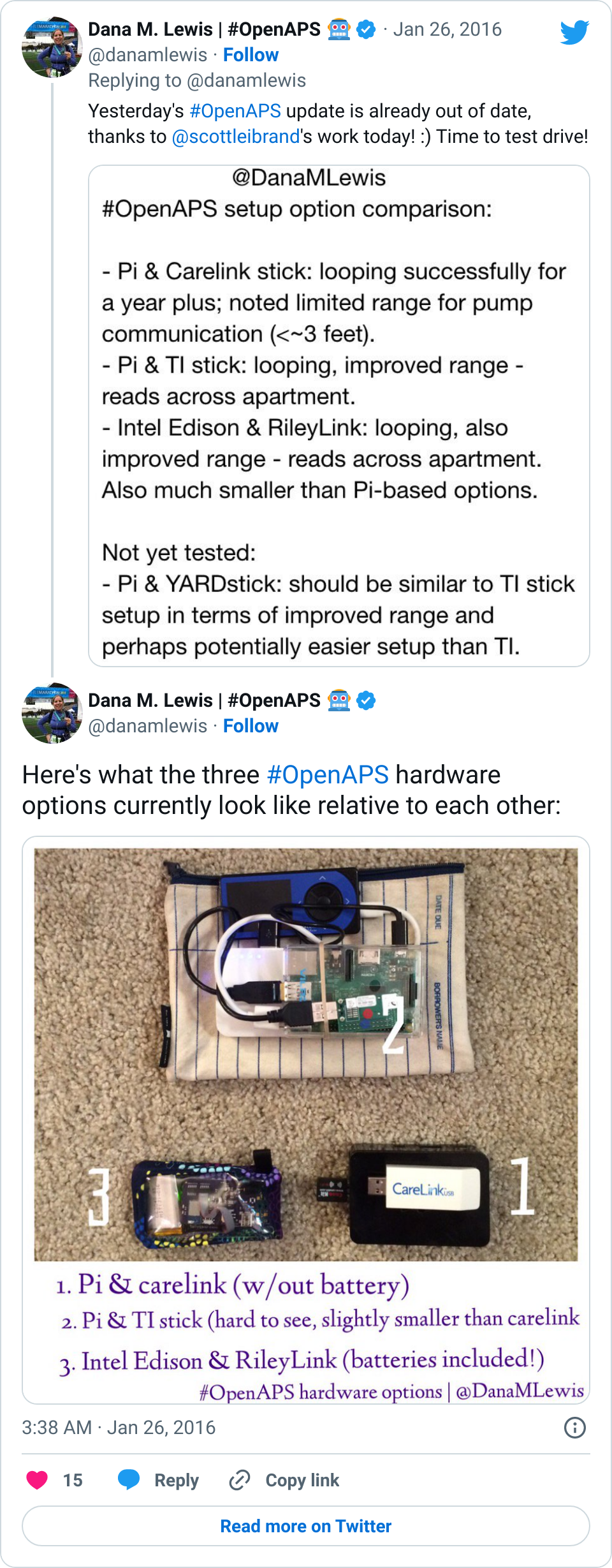
Some of the biggest improvements we’ve made to OpenAPS recently have been usability improvements. In February, someone kindly did the soldering of an Edison/Rileylink “rig” for me. This was just after I did a livestream Q&A with the TuDiabetes community, saying that I didn’t mind the size of my Raspberry Pi rig. I don’t. It works, it’s an artificial pancreas, the size doesn’t matter.
That being said… Wow! Having a small rig that clips to my pocket does wonders for being able to just run out the door and go to dinner, run an errand, go on an actual run, and more. I could do all those things before, but downsizing the rig makes it even easier, and it’s a fantastic addition to the already awesome experience of having a closed loop for the past 18 months (and >11,000 hours of looping). I’m so thankful for all of the people (Pete on Rileylink, Oscar on mmeowlink, Toby for soldering my first Edison rig for me, and many many others) who have been hard at work enabling more hardware options for OpenAPS, in addition to everyone who’s been contributing to algorithm improvements, assisting with improving the documentation, helping other people navigate the setup process, and more!
That leads me to today. I just finished participating in a month-long usability study focused on OpenAPS users. (One of the cool parts was that several OpenAPS users contributed heavily to the design of the study, too!) We tracked every day (for up to 30 days) any time we interacted with the loop/system, and it was fascinating.
At one point, for a stretch of 3 days, we counted how many times we looked at our BGs. Between my watch, 3 phone apps/ways to view my data, the CGM receivers, Scott’s watch, the iPad by the bed, etc: dozens and dozens of glances. I wasn’t too surprised at how many times I glance/notice my BGs or what the loop is doing, but I bet other people are. Even with a closed loop, I still have diabetes and it still requires me to pay attention to it. I don’t *have* to pay attention as often as I would without a closed loop, and the outcomes are significantly better, but it’s still important to note that the human is still ultimately in control and responsible for keeping an eye on their system.
That’s one of the things I’ve been thinking about lately: the need to set expectations when a loop comes out on the commercial market and is more widely available. A closed loop is a tool, but it’s not a cure. Managing type 1 diabetes will still require a lot of work, even with a polished commercial APS: you’ll still need to deal with BG checks, CGM calibrations, site changes, dealing with sites and sensors that fall out or get ripped out… And of course there will still be days where you’re sensitive or resistant and BGs are not perfect for whatever reason. In addition, it will take time to transition from the standard of care as we have it today (pump, CGM, but no algorithms and no connected devices) to open and/or closed loops.
This is one of the things among many that we are hoping to help the diabetes community with as a result of the many (80+ as of June 8, 2016!) users with #OpenAPS. We have learned a lot about trusting a closed loop system, about what it takes to transition, how to deal if the system you trust breaks, and how to use more data than you’re used to getting in order to improve diabetes care.
As a step to helping the healthcare provider community start thinking about some of these things, the #OpenAPS community submitted a poster that was accepted and will be presented this weekend at the 2016 American Diabetes Association Scientific Sessions meeting. This will be the first data published from the community, and it’s significant because it’s a study BY the community itself. We’re also working with other clinical research partners on various studies (in addition to the usability study, other studies to more thoroughly examine data from the community) for the future, but this study was a completely volunteer DIY effort, just like the entire OpenAPS movement has been.
Our hope is that clinicians walk away this weekend with insight into how engaged patients are and can be with their care, and a new way of having conversations with patients about the tools they are choosing to use and/or build. (And hopefully we’ll help many of them develop a deeper understanding of how artificial pancreas technology works: #OpenAPS is a great learning tool not only for patients, but also for all the physicians who have not had any patients on artificial pancreas systems yet.)
Stay tuned: the poster is embargoed until Saturday morning, but we’ll be sharing our results online beginning this weekend once the embargo lifts! (The hashtag for the conference is #2016ADA, and we’ll of course be posting via @OpenAPS and to #OpenAPS with the data and any insights coming out of the conference.)
This post was written months ago for Prescribe Design, and will also be posted/made available there as a collection of their stories by and about patients who design, but I am also posting here for anyone new to #DIYPS and/or wondering about how #OpenAPS came into existence.
—
About the author: Dana Lewis is the creator of #DIYPS, the Do-It-Yourself Pancreas System, and a founder of the #OpenAPS movement. (Learn more about the open source artificial pancreas movement at OpenAPS.org.) Dana can be found online at @DanaMLewis, #DIYPS, and #OpenAPS on Twitter, and also on LinkedIn.
—
Diabetes is an invisible illness that’s not often noticeable, and may be considered to be “easy” compared to other diseases. After all, how hard can it be to track everything you eat, check your blood glucose levels, and give yourself insulin throughout the day?
What most people don’t realize is that managing diabetes is an extremely complex task; numerous variables influence your blood glucose levels throughout the day, from food to activity to sleep to your hormones. Some of these things are easier to measure than others, and some are easier to influence than others, as I’ve learned over the past 13 years of living with type 1 diabetes.
Diabetes technology certainly helps – and those of us with access to insulin pumps and continuous glucose monitors are thankful that we have this technology to better help us manage our disease. But this technology is still not a cure. After I run a marathon, my blood sugar is likely to run low overnight for the next few nights. And the devices I use to help me manage still have major flaws.
For example, my continuous glucose monitor (CGM) gives me a reading of my blood glucose every 5 minutes – but I have to pay attention to it in order to see what is going on (pulling the device from my pocket and pressing a button to see my numbers). And what happens when I go to sleep? I am sleeping, rather than paying attention to my blood sugar.
Sure, you can set alarms, and if your blood glucose (BG) goes above or below your personal threshold, an alarm will sound. That’s great, unless you’re a sound sleeper like me who doesn’t always hear these sounds in my sleep – and unfortunately there’s no way on the device to make the alarms louder.
For years, I worried every night when I went to sleep that I would have a low blood sugar, not hear the alarm, and not wake up in the morning. And since I moved across the country for work, and lived by myself, it could potentially be hours before someone realized I didn’t show up for work, and days before someone decided to check on me inside my apartment.
I was worried about “going low” overnight, and I kept asking the device manufacturers for louder alarms. The manufacturers usually responded, “the alarms are loud enough, most people wake up to them!” This was frustrating, because clearly I’m not one of those people.
I realized that if only I could get my CGM data off my device in real-time, I could make a louder alarm by using my phone or my laptop instead of having to rely on the existing medical device volume settings. It would be as easy as using a basic service like IFTTT or an app like “Pushover” that allows you to customize alerts on an iPhone.
However, for the longest time, I couldn’t get my data off of my device. (In fact, for years I had NO access to my own medical device data, because the FDA-approved software only ran on Windows computers, and I had a Mac.) But in November 2013, I by chance found someone who tweeted about how had managed to get his son’s data off the CGM in real-time, and he was willing to share his code with me. And this changed everything.
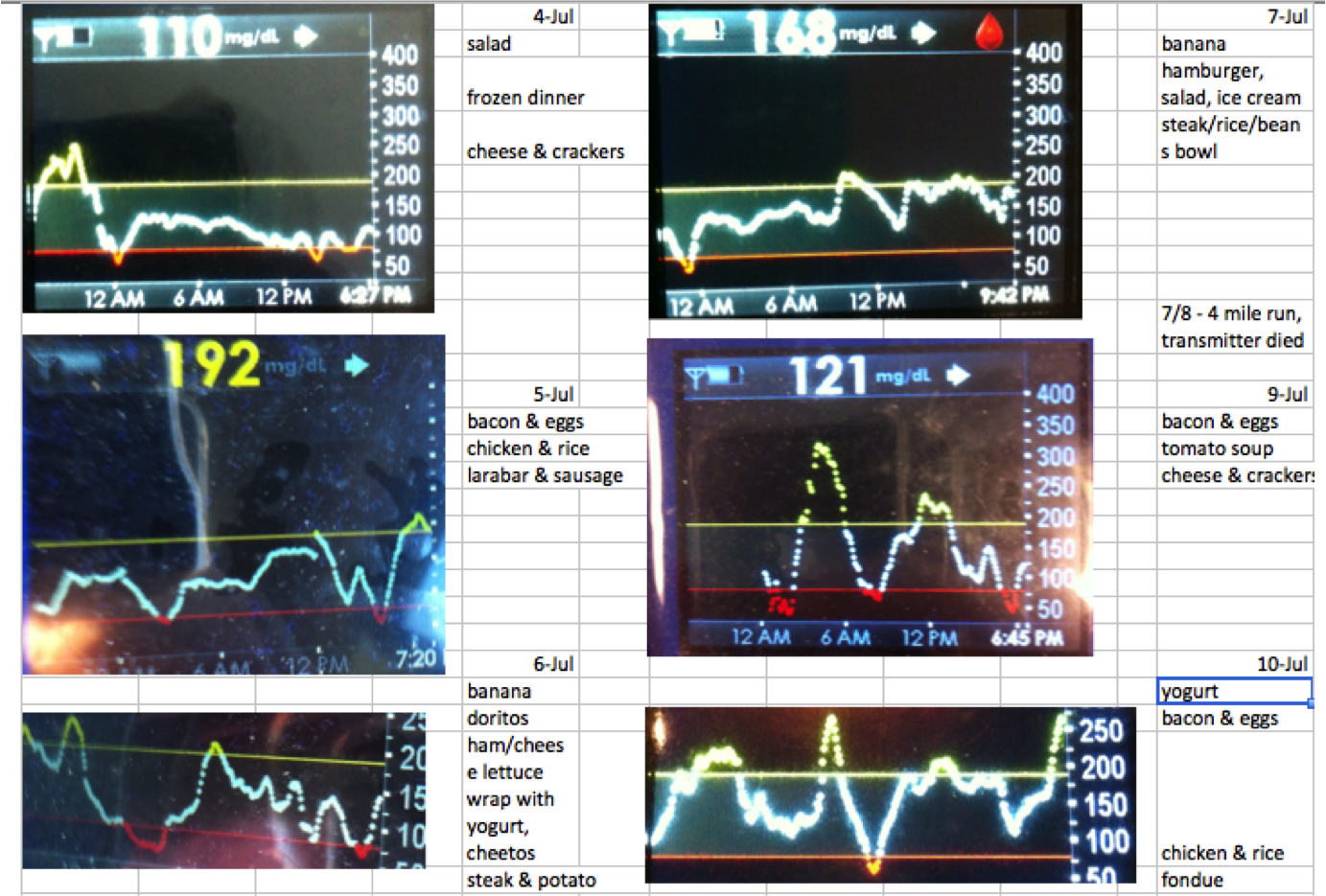
(At the time, my continuous glucose monitor only had FDA-approved software that could be used on a Windows computer. Since I had a Mac, when my endocrinologist asked for diabetes data, I took a picture with my iPhone and pasted the images into Excel, and printed it out for him. Data access is an ongoing struggle.)
My design “ah-ha” became a series of “wow, what if” statements. At every stage, it was very easy to see what I wanted to do next and how to iterate, despite the fact that I am not a designer and I am not a traditional engineer. I had no idea that within a year I would progress from making those louder alarms to building a full hybrid closed loop artificial pancreas (one that would auto-adjust the levels on my insulin pump overnight).
Once I had my CGM data, I originally wanted to be able to send my data to Scott (my then-boyfriend and now husband, who lived 20 miles away at the time) to see, but I didn’t want him to get alarms any time I was merely one point above or below my target threshold. What was important for him to know was if I wasn’t responding to alarms. We set up the system so that Scott could see whether or not I was taking action on a low reading, which I signaled by pressing a button. If the system alerted to Scott that I was not responding to a low reading, he could call and check on me, drive 20 miles to see me, or call 911 if necessary. (Luckily, he never needed to call 911 or come over, but within a week of building the first version of the system, he called me when my blood sugar was below 60 and I hadn’t woken up yet to the alarms.)
DIYPS prototype with Pebble
I realized next that if I was already pushing a button on the web interface (pictured), I might as well add three buttons and show him what action I was taking (more insulin, less insulin, or eating carbohydrates) in case I accidentally did the wrong thing in my sleep. I also customized the system so that I could log exactly how much insulin I was taking or how much I was eating.
Because I was entering every action I took (insulin given, any food eaten), we realized that this data could fuel real-time predictions and give precise estimates of where my blood sugar would be 30, 60, or 90 minutes in the future. As a result, I could see where my blood glucose level would be if I didn’t take action, and make sure I didn’t overcorrect when I did decide to take action. This was helpful during the day, too. The CGM has alarm thresholds that notify you if you cross the line; but #DIYPS will predict ahead of time that I am likely to go out of range, and will recommend action to help prevent me from crossing the threshold.
The system worked great and generated many alarms that woke me up at night. (Ironically, we generated so many alarms that Scott would periodically change the sound of the alarm without telling me, because my body would get used to ignoring the same sound over time!) The next step was deciding to get a smart watch (in my case, a Pebble) so I could see my data on my watch, and reduce the amount of time I spent pulling my CGM receiver out of my pocket and pressing the button to turn the screen on. With a watch, it was also easier to see real-time push alerts that the system would send me to tell me to take action. As a result, I was able to begin to spend less time throughout the day worrying about my blood sugar, and more time living my life while the system ran in the background, updating every few minutes and alerting me as to when I needed to pay attention when something changed.
We called this system the “Do It Yourself Pancreas System”, or #DIYPS, and we developed it completely in our “free time” on nights and weekends.
People often ask what my health care provider thinks. He didn’t appear very interested in hearing about this system when I first mentioned it, but he was glad to hear I was having positive outcomes with it.
More significantly, I had a lot of other people with diabetes interested in it and wanting to know how they could get it.
As a patient, I can only design tools and technology for myself; but because it would be seen by the FDA as a class III medical device (and making dosing recommendations from a CGM rather than a blood glucose meter, which the CGM is not approved for), I can not distribute it to other people to use as it would have to first be reviewed and regulated by the FDA.
We also kept iterating on #DIYPS and the algorithms I use to predict when my blood sugar is going to end up high or low. By the time we made it to November of 2014, we realized that we had a well-tested system that did an excellent job giving precise recommendations of adjusting insulin levels. If only we had a way to talk to my insulin pump, we theorized that we could turn it into a fully closed loop artificial pancreas – meaning that instead of only allowing my insulin pump to give me a pre-determined amount of insulin throughout the night, a closed loop system would instead take into account my blood sugar and make the automatic needed adjustments to give me more or less insulin as needed to keep me in range.
With the help of Ben West, another developer we met while working on Nightscout, who has spent years working on tools to communicate with diabetes devices, we were able to take a carelink USB stick and use it to communicate with my insulin pump. Plugged into a raspberry pi (a small, pocket sized computer), the carelink USB stick could pull from our algorithms, read from the pump, write commands (in the form of temporary basal rates for 30 minutes), read back the results, update the algorithm and generate new predictions and action items, and then do the same process over and over again.
And so, with the help of various community members, we had closed the loop with our artificial pancreas. And once I had it turned on, testing, and working, it was hard to convince me to take it off. This was December of 2014. More than a year and a half later, I’m still wearing and using it every day and night.
There are definitely challenges to having self-designed a device. There are usability issues, such as the burden of keeping it powered and extra supplies to haul around. But as a patient, and as the designer, I can constantly iterate and make improvements to algorithms or the device setup itself and make it better as I go, all while having the benefit of this lifesaving technology (and more importantly, having the peace of mind to be able to go to sleep safely at night).
And, I have the ability to communicate and spread the word that this type of DIY technology is possible. I frequently talk with others who are interested in building their own artificial pancreas system as part of the OpenAPS movement. Like #DIYPS, I can’t give away an #OpenAPS implementation or build someone else an artificial pancreas. But through #OpenAPS, the community has collectively published a reference design, documentation and code, and established a community to support those who are choosing to do an n=1 implementation, following the reference design we have shared. As of the beginning of May 2016, there have been a total of 56+ people who have decided to close the loop by building individual OpenAPS implementations, with more in progress. (And today, you can see the latest community count of DIY closed loopers here.) You can read more here about the risks and how it is a personal decision to decide to build your own system; each person has to decide if the work to DIY and the risk is worth the potential reward.
For me, this definitely has been and is worth the time and effort. It’s worth noting that I am glad there are traditionally designed devices going into clinical trials and are in the pipeline to be made available to more people. But the timeline for this is years away (2017-2018), so I am also glad that the technology (including social media to enable our community to connect and design new tools together) is where it is today.
You don’t have to be an engineer, or formally trained, to spot a problem with disease management or quality of life and build a solution that works for you. Who knows – the solution that works for you may also work for other people. We can design the very tools we need to make our lives with diabetes, and other diseases, so much better – and we shouldn’t wait to do so.
Our friend Anna McCollister-Slipp first alerted us to the proposed draft guidance recently released from the FDA, covering medical device interoperability. (You can read the draft guidance linked here.) We were subsequently among those asked by Amy Tenderich, and others, to share our initial thoughts and comments in response to the draft guidance. We wanted to publicly share our initial thoughts as a draft comment in response to the proposed guidelines (which we plan to officially submit as well), in hopes of encouraging subsequent discussion and additional commentary submitted in response to the draft guidance. We’d love to hear your thoughts after you read the linked guidance, as well as our comment below, and also encourage you to consider submitting a comment to the FDA regarding the guidance.
The proposed FDA guidance on medical device interoperability is a gesture in the right direction, and is clearly intended to encourage medical devices to be designed with interoperability in mind. However, in the current draft form, the proposed guidance focuses too much on *discouraging* manufacturers from including the kinds of capabilities necessary to allow for continued innovation (particularly patient-led innovation as seen from the patient-driven #WeAreNotWaiting community). Instead, much of the guidance assumes that manufacturers should only provide the bare minimum level of interoperability required for the intended use, and even goes so far as to suggest they “prevent access by other users” to any “interface only meant to be used by the manufacturer’s technicians for software updates or diagnostics”. There is also much note of “authorized users”, which is language that is often currently leaned upon in the real world to exclude patients from accessing data on their own medical devices – so it would be worthwhile to further augment the guidance and/or more specifically review the implications of the guidance with an eye toward patients/users of medical devices. The focus on including information on electronic data interfaces in product labeling is a good inclusion in the guidance, but it would be far more powerful (and less likely to be interpreted as a suggestion to cripple future products’ interoperability capabilities) if manufacturers were encouraged to properly include interface details for *all* their interfaces, not just those for which the manufacturer has already identified an intended use case.
Specific suggestions for improving the proposed guidance on medical device interoperability:
The guidance needs to more explicitly encourage manufacturers to design their products for *maximum* interoperability, including the ability for the device to safely interoperate with devices and for use cases that are not covered by the manufacturer’s intended uses.
Rather than designing device interoperability characteristics solely for intended uses, and withholding information related to non-intended uses, manufacturers should detail in product labeling the boundaries of the intended and tested use cases, and also provide information on all electronic data interfaces, even those with no manufacturer-intended use. Labeling should be very clear on the interfaces’ design specifications, and should detail the boundaries of the uses the manufacturer intended, designed for, and tested.
The guidance should explicitly state that the FDA supports allowing third parties to access medical devices’ electronic data interfaces, according to the specifications published by the manufacturers, for uses other than those originally intended by the manufacturer. They should make it clear that any off-label use by patients and health care professionals must be performed in a way that interoperates safely with the medical device per the manufacturer’s specifications, and it is the responsibility of the third party performing the off-label use, not the manufacturer, to ensure that they are making safe use of the medical device and its electronic data interface. The guidance should make clear that the manufacturer is only responsible for ensuring that the medical device performs as specified, and that those specifications are complete and accurate.
With these kinds of changes, this guidance could be a powerful force for improving the pace of innovation in medical devices, allowing us to move beyond “proprietary” and “partnership” based solutions to solutions that harness the full power of third-party innovation by patients, health care professionals, clinical researchers and other investigators, and startup technology companies. The FDA needs to set both clear rules that require manufacturers to document their devices capabilities as well as guidance that encourages manufacturers to provide electronic data interfaces that third parties can use to create new and innovative solutions (without introducing any new liability to the original manufacturer for having done so). If the FDA does so, this will set the stage to allow innovation in medical devices to parallel the ever-increasing pace of technological innovation, while preserving and expanding patients rights to access their own data and control their own treatment.
 And if you’re looking to DIY closed loop before a commercial solution is available, you might also be interested in checking out the OpenAPS Reference Design and some FAQs related to OpenAPS.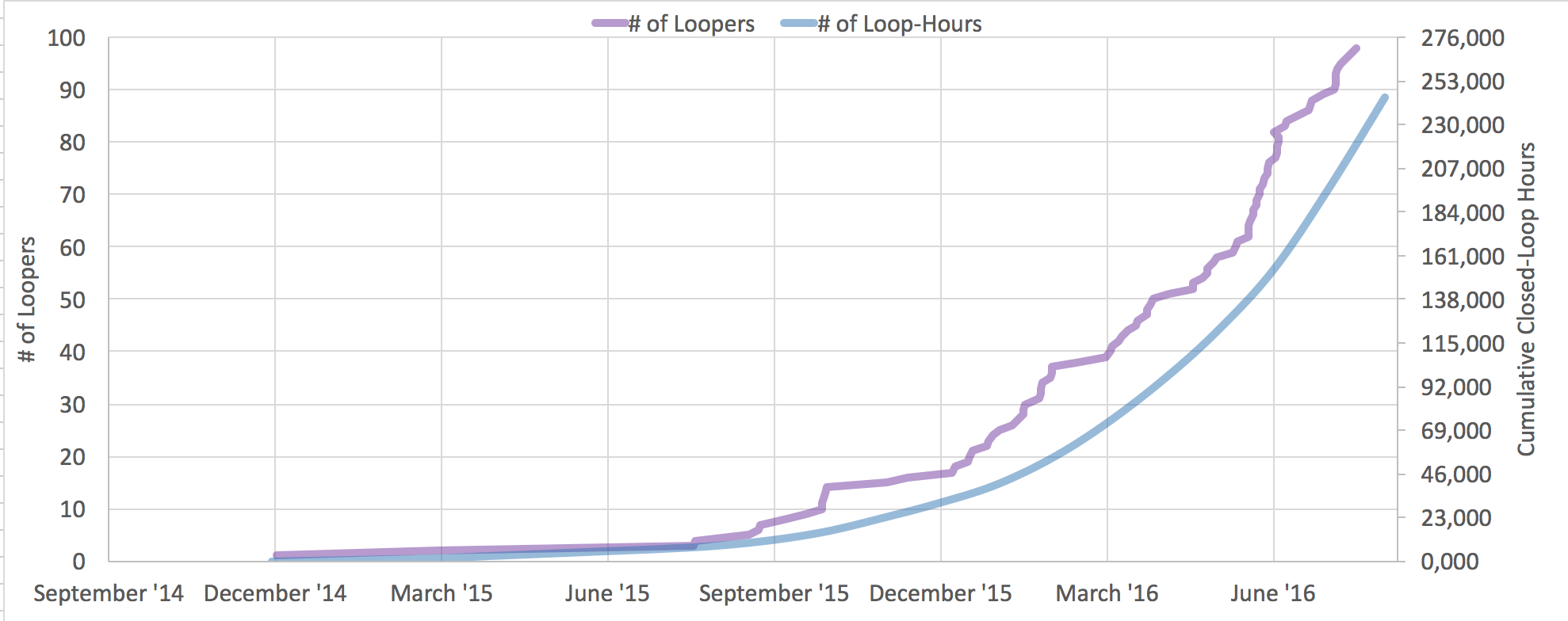


Recent Comments