The data we are leaving behind in clinical trials, what it costs us, and why we should talk about it

I talk a lot about the data we leave behind. A lot of this time, this is in the context of clinical trial design. But more recently, it’s also about the data loss that drives bias in AI. And actually…that same bias exists in humans. And seeking to fix one may also fix the other!

To clarify, it’s not that no one cares (as a reason for why data loss or missingness happens). It is an artifact of our systems, funding priorities, and a whole bunch of historical decision making. Clinical trials cost money and are usually designed to answer a question around safety or efficacy, often in pursuit of regulatory approval and eventual commercial distribution. We need that (I’m not saying we don’t!), but we also need funding sources to answer additional questions related to titration, individual variance, medication impacts, more diseases, etc.

A lot of trials exclude people with type 1 diabetes, for example, so it’s always a question when new medications or treatments roll out whether they are appropriate or useful for people with T1D or if there’s a reason why they wouldn’t work. This is because sometimes T1D might be seen as a muddy variable in the study, but a lot of times it’s just a copy-paste decision from a previous study where it did matter that is propagated forward into the next study where it doesn’t matter. There is no resulting distinction between the two: there is simply a lack of representation of people with T1D in the study population and this means it’s hard to interpret and make decisions about this data in the future.

A lot of decisions around what data is collected, or who is enrolled in a population for a study, is an artifact of this copy-paste! Sometimes literal copy-paste, and sometimes a mental copy-paste for “we do things this way” because previously there was a reason to do so. Often that’s cost (financial or time or hardship or lack of expertise). But, in the era of increasing technological capabilities and lower cost (everything from the cost of tokens to LLM to the decreasing cost of storage for data long-term, plus the reduced cost on data collection from passive wearables and phone sensors or reduced hardship for participants to contribute data or reduced hardship for researchers to clean and study the data) this means that we should be revisiting A LOT of these decisions about ‘the way things are done’ because the WHY those things were done that way has likely changed.

The TLDR is that I want – and think we all need – more data collected in clinical trials. And, I don’t think we need to be as narrow-minded any more about having a single data protocol that all participants consent to. Hold up: before you get the torches and pitchforks out, I’m not saying not to have consent. I am saying we could have MULTIPLE consents. One consent for the study protocol. And a second consent where participants can evaluate and decide what additional permissions they want to provide around data re-use from the study, once the study is completed. (And possibly opt-in to additional data collection that they may want to passively provide in parallel).

The reason I think we should shift in this direction is because that, out of extreme respect to patient preferences around privacy and protecting patients (and participants in studies – I’ll use participants/patients interchangeably because it happens in clinical care as well as research), researchers sometimes err on the side of saying “data not available” after studies because they did not design the protocol to store the data and distribute it in the future. A lot of times this is because they believe patients did not consent (because researchers did not ask!) for data re-use. Other times it’s honestly – and I say this as a researcher who has collaborated with a bunch of people at a bunch of institutions globally – inadvertent laziness / copy-and-paste phenomenon where it’s hard to do the very first time so people don’t do it, and then it keeps getting passed on to the next project the same way, because admittedly figuring it out and doing it the first time takes work. (And, researchers may have not included in their budgets to cover data storage, etc.). Thus this propagates forward. Whereas you see researchers who do this on one project tend to continue doing it, because they’ve figured it out – and written it into their research budgets to do so for subsequent projects. And other times, the lack of data re-use is a protective instinct because researchers may have concern that the data may be used in a way that is harmful or negative. Depending on the type of data (genetic data versus glucose data, as two examples), that may be a very legitimate concern of study participants. Other times, it may be at odds with the wishes of the broad community perspective. And sometimes, individuals have different preferences!

We could – and should – be able to satisfy BOTH preferences, by having an explicit consent (either opt-in or opt-out, depending on the project) that is an ADDITIONAL consent specifically indicating preferences around data being re-used for additional studies.

To emphasize why this matters, I’ll circle back to AI/LLMs. A criticism of AI is that they are trained on data that is not representative; has holes; or is biased. This is legitimate and an artifact of the past design of trials. I have been thinking through the opportunities this provides now, in the current era of trial design, to be proactive and strategic about generating and collecting data that will fill these holes for the future! We can’t fix the way past trials were done; but we can adjust how we do trials moving forward, fill the holes, and update the knowledge base. This actually then fixes the HUMAN PROBLEM as well as the AI problem: because these criticisms of AI are the same criticism we should be making about humans (researchers and clinicians etc), who are also trained on the same missing, messy, possibly biased data!

More data; more opt-in/out; more strategery in thinking about plugging the holes in the knowledge base moving forward in part by not making the same mistakes in future research that we’ve made in the past. We should be designing trials not only for narrow endpoints (which we can also do) for safety and efficacy and regulatory approval and commercial availability, but also for answering the questions patients need answered when evaluating these treatments in the future: everything from titration to co-conditions to co-medications to the arbitrary research protocol decisions around the timing of treatment or the timing of the course of treatment. A lot of this could be better answered by data re-use beyond the additional trial as well as additional data collection in conjunction to the primary and secondary endpoints.

All of this is to say…you may not agree with me. I support that! I’d love to know (constructively; as I said, no pitchforks!) what you disagree about, or what you are violently nodding your head in agreement about, or what nuances or big picture things are being overlooked. And, I have an invitation for you: CTTI – the Clinical Trials Transformation Institute – is hosting a 2-hour summit on April 28 (2026) for patients, caregivers, and patient advocates designed to facilitate discussion around the range of perspectives on these topics as they apply to clinical trials. Specifically 1) the use of AI in clinical trials and 2) perspectives on data re-use beyond the initial trial that data is collected for.

If you have strong opinions, this is a great place for you to share them and hear from others who may have varying or similar perspectives. I am expecting to learn a lot! This event is not designed around creating consensus, because we know there are varying perspectives on these topics, and thus especially if you disagree or have a nuanced take your voice is needed! (I may be in the minority, for example, with my thoughts above.) The data we leave behind in clinical trials, what it costs us, and why we should talk about it - a blog by Dana M. Lewis on DIYPS.orgParticipation is focused (because these topics are scoped to focus on clinical trials) on anyone who has ever been part of a clinical trial, is currently navigating one, made the decision to leave a trial early, or even those who looked into participating but ultimately decided it wasn’t the right fit .

You can register for the summit here (April 28, 2026 10am-noon PT / 1-3pm ET), and if you can’t attend, feel free to drop a comment here with your thoughts and I’ll make sure it is shared and included in the notes for the event that will also be shared out afterward aggregating the perspectives we hear from.

Baseline Pilot – a leading indicator for biometric data and tool for reducing infection spread

What if you could stop the spread of infection once it arrives at your house? This is easier to do now than ever before in the era of wearables like smart watches and smart rings that gather biometric data every day and help you learn what your baseline is, making it easier to spot when your data starts to deviate from baseline. This data often is the first indicator that you have an infection, even before you develop symptoms sometimes.

But, you need to know your baseline in order to be able to tell that your data is trending away from that. And despite the fact that these new devices making it easier to have the data, they actually make it surprisingly challenging to *quickly* get the new data on a daily basis, and the software they have programmed to catch trends usually only catches *lagging* trends of changes from baseline. That’s not fast enough (on either of those metrics) for me.

(The other situation that prompted this is companies changing who gets access to which form of data and beginning to paywall long-time customers out of previous data they had access to. Ahem, looking at you, Oura.)

Anyway, based on past experiences (Scott getting RSV at Thanksgiving 2024 followed by another virus at Christmas 2024) we have some rich data on how certain metrics like heart rate (RH), heart rate variability (HRV), and respiratory rate (RR) can together give a much earlier indication that an infection might be brewing, and take action as a result. (Through a lot of hard work detailed here, I did not get either of those two infections that Scott got.) But we realized from those experiences that the lagging indicators and the barriers in the way of easily seeing the data on a daily basis made this harder to do.

Part of the problem is Apple and their design of “Vitals” in Apple Health. They have a “Vitals” feature that shows you ‘vital’ health metrics in terms of what is typical for you, so you can see if you fall in the range of normal or on the higher or lower end. Cool, this is roughly useful for that purpose, even though their alerts feature usually lag the actual meaningful changes by several days (usually by the time you are fully obviously symptomatic). But you can’t reliably get the data to show up inside the Vitals section, even if the raw data is there in Apple Health that day! Refreshing or opening or closing doesn’t reliably force it into that view. Annoying, especially because the data is already there inside of Apple Health.

This friction is what finally prompted me to try to design something: if the data is there inside Apple Health and Apple won’t reliably show it, maybe I could create an app that could show this data, relative to baseline, and do so more reliably and quickly than the “Vitals” feature?

Turns out yes, yes you can, and I did this with BaselinePilot.

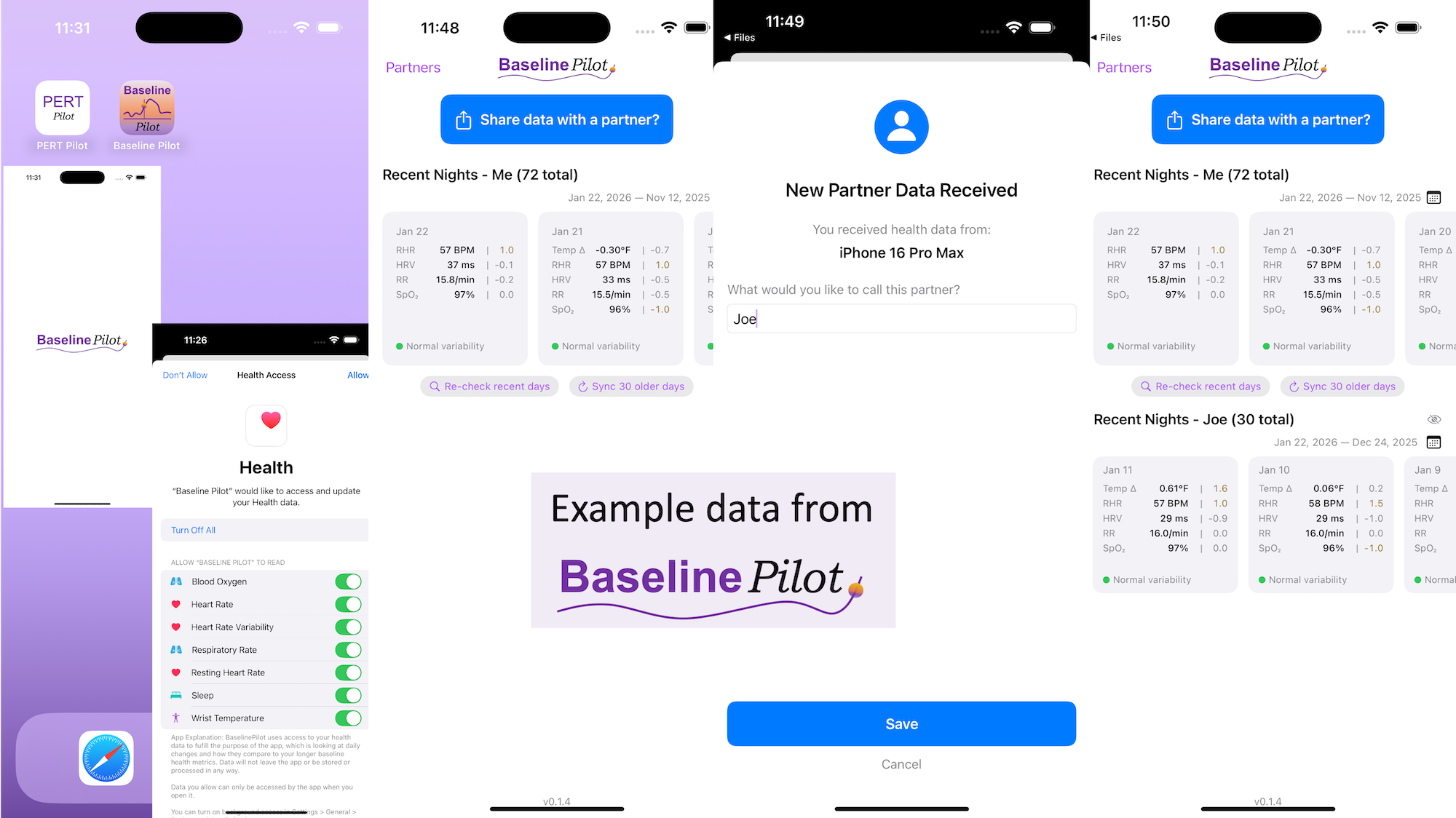
BaselinePilot is an iOS app that pulls in the HealthKit data automatically when you open it, and shows you that day’s data. If you have a wearable that pushes any of these variables (heart rate, heart rate variability, respiratory rate, temperature, blood oxygen) into Apple Health, then that data gets pulled into BaselinePilot. If you don’t have those variables, they don’t show up. For example, I have wearables that push everything but body temp into Apple Health. (I have it on a different device but I don’t allow that device to write to Health). Whereas Scott has all of those variables pushed to Health, so his pulls in and displays all 5 metrics compared to the 4 that I have.

What’s the point of BaselinePilot? Well, instead of having to open Apple Health and click and view every one of those individual metrics to see the raw data and compare it to previous data (and do it across every metric, since Vitals won’t reliably show it), now at a glance I can see all of these variables raw data *and* the standard deviation from my baseline. It has color coding for how big the difference is and settings to flag when there is a single metric that is very far off my baseline or multiple variables that are moderately off the baseline, to help me make sure I pay attention to those. It’s also easy to see the last few days or scroll and continue to see the last while, and I can also pull in historical data in batches and build as much history as I want (e.g. hundreds of days to years: whatever amount of data I have stored in Apple Health).

So for me alone, it’s valuable as a quick glance “fetch my data and make sure nothing is wonky that I need to pay attention to or tell someone about”. But the other valuable part is the partner sharing feature I built in.

With partner sharing, I can tap a button (it shows up as a reminder after your data is synced) and text a file over to Scott (or vice versa). Opening the file in iMessage shows a “open in BaselinePilot” button at the bottom, and it immediately opens the app and syncs the data. You can assign a display name to your person and thus see their data, too, in the same format as yours. You can hide or delete this person or re-show them at any time. This is useful for if you are going on a long vacation and sharing a house with family members, for example, and so you want to share/see your data when you’re going to be in physical proximity but then don’t need to see them after that – you can hide them from view until that use case pops up again.

Screenshots of BaselinePilot, showing 72 days of simulated data for the user (not actually my data) and the display with a simulated partner called "Joe".
Simulated data and simulated partner data displayed in BaselinePilot.

Ideally, I’d love to automate this data syncing with partners (who agree) over Bluetooth, so you don’t have to tap to share the file on a regular basis. But, that won’t work with the current design of phones and the ability to background sync automatically without opening the app, so I’ve stopped working on Bluetooth-based solutions given the technical/policy constraints in the phone ecosystems right now. Eventually, this could also work cross-platform where someone could generate the same style file off of their Android-based BaselinePilot and be able to share back and forth, but Scott and I both use iPhones so right now this is an iOS app. (Like BookPilot, I built this for myself/our use case and didn’t intend to distribute it; but if this sounds like something you’d use let me know and I could push BaselinePilot to the app store for other people to use.)

BaselinePilot: a leading indicator for biometric data and tool for reducing infection spread. A blog post by Dana M. Lewis on DIYPS.orgAll of this data is local to the app and not being shared via a server or anywhere else. It makes it quick and easy to see this data and easier to spot changes from your normal, for whatever normal is for you. It makes it easy to share with a designated person who you might be interacting with regularly in person or living with, to make it easier to facilitate interventions as needed with major deviations. In general, I am a big fan of being able to see my data and the deviations from baseline for all kinds of reasons. It helps me understand my recovery status from big endurance activities and see when I’ve returned to baseline from that, too. Plus the spotting of infections earlier and preventing spread, so fewer people get sick during infection season. There’s all kinds of reasons someone might use this, either to quickly see their own data (the Vitals access problem) or being able to share it with someone else, and I love how it’s becoming easier and easier to whip up custom software to solve these data access or display ‘problems’ rather than just stewing about how the standard design is blocking us from solving these issues!


What else have I built that you might like to check out? I just built “BookPilot”, a tool to help you filter book recommendations by authors you’ve already read, based on the list of books you’ve already read from your library data. If you use iOS, check out Carb Pilot to help get AI-generated estimates (or enter manual data, if you know it) to track carbs or protein etc and only see which macronutrients you want to see. If you have EPI (exocrine pancreatic insufficiency, also called PEI), check out “PERT Pilot” either on iOS or Android to help you track your pancreatic enzyme replacement therapy.

BookPilot: What Should I Read Next?

Book hangovers are the worst. By book hangover, I mean that feeling you get at the end of a book when you come up for air and don’t know what you’re going to read next. In general, or because you have to ‘world switch’ from one type of book or one genre or one era to another (my most common cause), or because you don’t have any books picked out to read next.

I get this feeling, a lot, because I read a lot (hundreds of books per year). I also listen to a lot of audiobooks when I’m out doing long distance activities that take several hours (e.g. ultrarunning, hiking, or cross country skiing). So while I read 5x more books than I listen to audiobooks, I still consume several audiobooks per month, too, but I’m picky about what I like to read versus what I like for audiobook content. I regularly and periodically peruse catalog additions to my various* libraries’ digital collections under genres I like to read and under audiobook categories, putting things on hold so I always have a pipeline of things ready to read or listen to. But, this relies on me periodically doing so, and sometimes the influx of new things to read based on those effort dries up and I have fewer books on hand than I would like, especially when I know I’m going to be reading more (e.g. I have some downtime from not feeling well and will be reading more than normal or when I’m traveling/on vacation).

It occurred to me the other day that it would be nice to be able to automatically check authors I have read for new books and to be able to put those books on hold. The problem is that I read a lot. I have dozens if not hundreds of authors I like, and while I remember a few to check, I don’t have a good way to do this systematically. My brain finally put 2 and 2 together this week when it occurred to me that if Libby (the e-book/reading app now used by most of my libraries) allowed me to export my data, I could systematically list and look up authors and check for recent/new additions to their catalog. Ooooh.

Like most things now, there are usually ways to export or access all sorts of data whenever you’re ready to use it. Libby actually now makes it easy in the app to do this, without having to request or log in to the web portal or do any obnoxious behaviors. Tap Shelf>Timeline>look at “Actions” button in the top right. It gives you not one but THREE ways to export your data, wahoo! If I have the data, what could I do with it?

(TL;DR the rest of this: in less than a day, I built a tool that I call BookPilot which allows me to take the Libby data, parse it for the books & authors I have read, check those authors for every book they’ve ever written, then display it for me. BookPilot solves the ‘what should I read next?’ problem by systematically finding all unread books from authors I have already read. I can then easily mark off books I’ve read elsewhere (e.g. read before my Libby history started or in physical format), kick out books I know I don’t want to read, and otherwise have an awesome list of books ready to go the next time I want to spend some time checking out books and/or putting more things on hold! It works really well and that’s just on the authors I’ve already read – I plan to also add recommendations for new authors that match my favorite authors, genres, etc. There is a web dashboard where you can view and interact with the recommendations as well as the ability to work with this data via the command line.)

The whole goal was to help fuel my book pipeline and to be able to recommend books that are highly probable that I want to read, based on my past reads, but to automatically filter by what I’ve already read. (That’s a problem with asking chatbots or using other tools: it’ll show you ‘books like this’ but when you read hundreds per year, you don’t remember the covers or names of all the books you’ve read so you spend a lot of time re-checking things you’ve in fact already read.)

I started by taking the Libby data export (you can get it as CSV, json, or html) and having Cursor write a script to pull the book title and author for everything I’ve read in my export. This is about 800 books and ~350 or so authors from the last 2.75 years (when I switched from Overdrive to Libby and it started recording my history; before I wasn’t having it log my reads). It then takes every single author on the list, queries the Open Library API to find the author’s Open Library ID, then fetches all their works (up to 100 books per author at a time) using the author’s works endpoint; it then supplements this data with Google Books API queries. All API responses are cached locally to avoid rate limits, and requests include built-in rate limiting delays between calls. It stores all books by each author with metadata: title, ISBN, publication date, series information, categories/genres, format availability. It then cross-references catalog books with my reading history to mark read/unread status, attempts to filter out duplicates and non-English versions (e.g. “Anne of Green Gables” and “Anne of Green Gables (German Edition)” versus Anne of Green Gables in the actual german language title and also “Anne of Green Gables / Anne of Avonlea (Box Set)” etc). It takes a while if you have hundreds of authors but the script is set up so you can start/stop it and it will pick up where you left off. The next time you check, it will check and only add books that are more recently published (customizable thresholds, of course) so future catalog checks will be quick to look for recent additions.

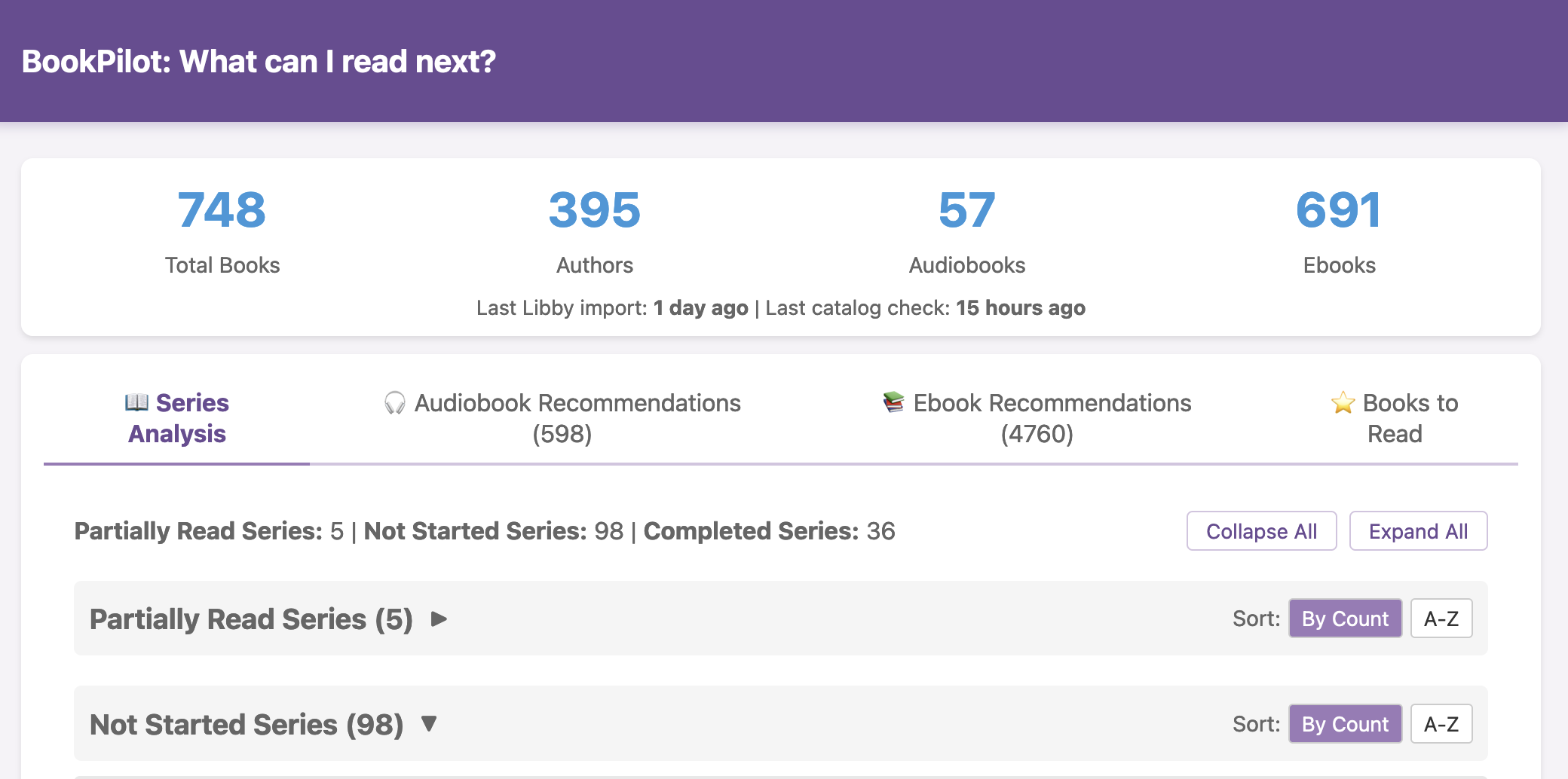
Then I have a dashboard that sorts and shows me all these books, ordered by series (when series info is available) so I can see a) series I have not read from authors I have already read and b) any books in a series that I have partially read; I can also sort by author’s name or highest count of the books I haven’t read, e.g. maybe I’ve read one book from an author but they have another 30 books to consider!

(On first pass, I still need to go through and mark books that I have read from >=3 years ago digitally and/or in physical form. But a quick look has already shown that this system works great and I’ve already been able to instantly add a bunch of books to my to-read list and holds already!)

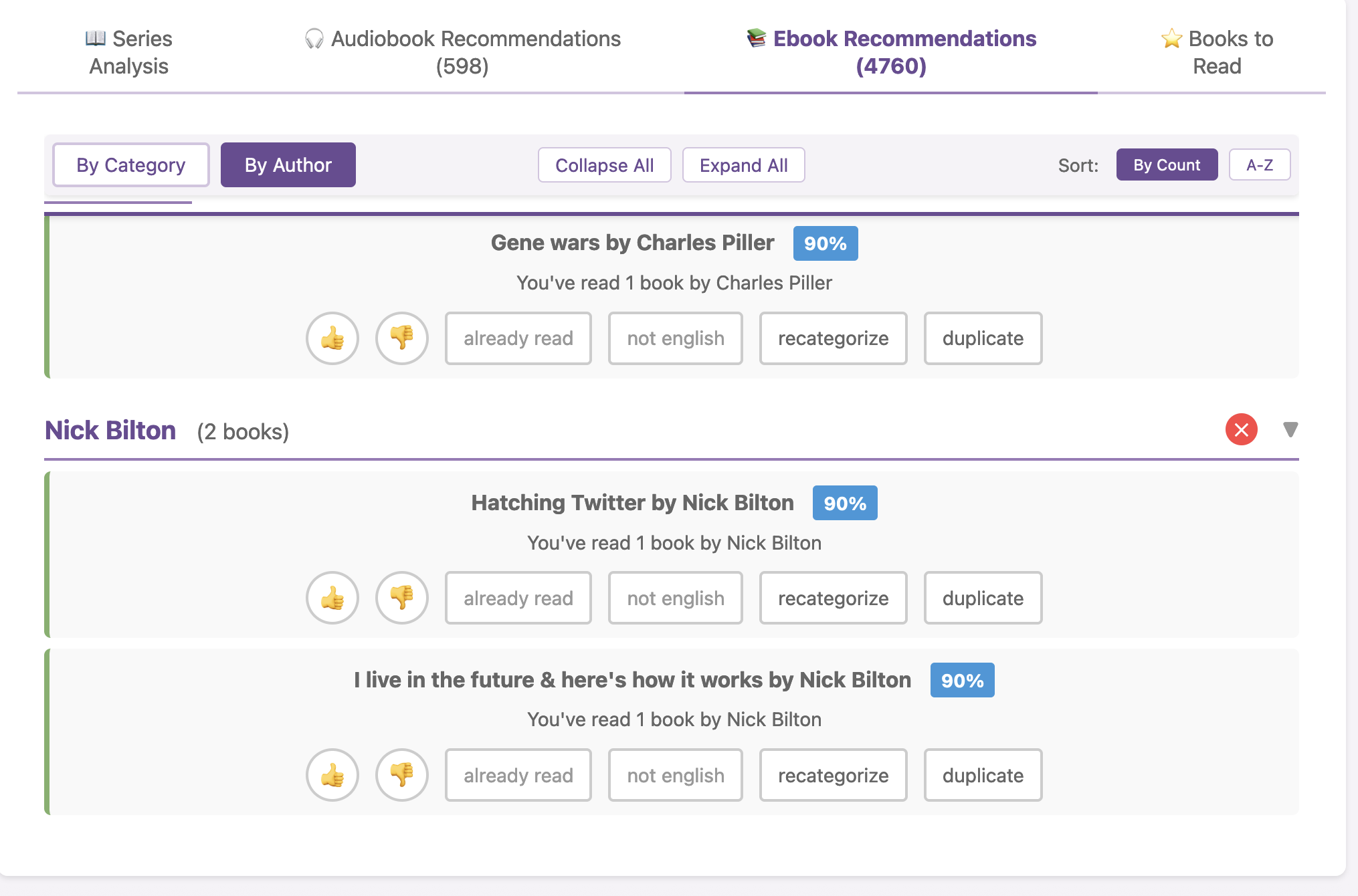
I added a thumbs up feature which automatically ports a book to my “books to read” tab, which answers my “what should I read next?” question. If I thumbs down a book, it goes away from the dashboard. I can also tag “already read” (also disappears it), “not in English” (e.g. my filters missed that this is a non-English version on the first pass) or “duplicate” for duplicate titles that have somehow crept into the listing.

I have separate recommendation lists for authors I’ve listened to (audiobooks) versus authors I’ve read (ebooks), so I can also have a good queue to fill for similar audiobook content.

I have a ton (hundreds of audiobooks, thousands of ebooks) to review, based on my ~800 books read in the last <3 years, from 350+ distinct authors. It’s delightfully overwhelming to have this many recommendations! There is nothing worse than a book hangover combined with having nothing in the reading queue and having to fight the book hangover and having to simultaneously search for what’s available and what you want to read next. (It’s like feeling hangry…book hangover hangry?) This system now means I won’t have that combination problem again: I will always have books lined up to read and if not I can quickly and more easily identify off this list from my known authors where they’ve added books or they have additional series or I can (eventually) find series from the same “era”/”genre”/”world” to continue reading and pick up where my brain left off.

Book Pilot series recommendation of books you have not read from authors you have already read Book Pilot dashboard recommendation of books you have not read from authors you have already read.

Eventually, I’m going to add some recommendations for new authors that ‘match’ my most-read authors in different categories. But I don’t have to, yet, because I have so many high-ROI options based on my current author list! And the next time I drop in an updated Libby export, it will add the new authors I’ve read *and* automatically remove books from my “books to read” list that appear in my reading history.

BookPilot: answering 'what should I read next' by filtering what I have already read. A blog post from Dana M. Lewis on DIYPS.orgI haven’t open-sourced BookPilot yet, but I can (UPDATE: it’s now open source!)) – if this sounds like something you’d like to use, let me know and I can put it on Github for others to use. (You’d be able to download it and run it on the command line and/or in your browser like a website, and drop your export of Libby data into the folder for it to use). (And did I use AI to help build this? Yes. Could you one-shot a duplicate of this yourself? Maybe, or otherwise yes you could in several hours replicate this on your own. In fact, it would be a great project to try yourself – then you could design the interface YOU prefer and make it look exactly how you want and optimize for the features you care about!)


* Pro tip: if you live in Washington state, most county libraries have “reciprocal” agreements if their counties offer services to each other. This means that because I lived in Seattle and have a SPL card and a King County (KCLS) card, I can also get Pierce County, Sno-Isle, etc etc etc…. It’s mainly digital collection access, but this is amazing because you can have all of these library cards added to your Libby account and when you want to go get a book, you can check ALL of your catalogs. Sometimes a book is on most of these systems and I can get on the hold list for the one with the shortest wait time. Other times, it’s only in ONE catalog and I wouldn’t have been able to get it without these reciprocal county cards because it wasn’t in SPL or KCLS (my primary local libraries)! And even when books are not in any collection yet you can add a smart tag and be notified automatically whenever something IS added to *any* of your libraries. It’s amazing. Not sure if other states or areas have these types of setups but you should look to see if you can access other catalogs/get cards, and if you live in Washington and love to read, definitely do this!


What else have I built that you might like to check out? If you use iOS, check out Carb Pilot to help get AI-generated estimates (or enter manual data, if you know it) to track carbs or protein etc and only see which macronutrients you want to see. If you have EPI (exocrine pancreatic insufficiency, also called PEI), check out “PERT Pilot” either on iOS or Android to help you track your pancreatic enzyme replacement therapy.

Beware “too much” and “too little” advice in Exocrine Pancreatic Insufficiency (EPI / PEI)

If I had a nickel every time I saw conflicting advice for people with EPI, I could buy (more) pancreatic enzyme replacement therapy. (PERT is expensive, so it’s significant that there’s so much conflicting advice).

One rule of thumb I find handy is to pause any time I see the words “too much” or “too little”.

This comes up in a lot of categories. For example, someone saying not to eat “too much” fat or fiber, and that a low-fat diet is better. The first part of the sentence should warrant a pause (red flag words – “too much”), and that should put a lot of skepticism on any advice that follows.

Specifically on the “low fat diet” – this is not true. A lot of outdated advice about EPI comes from historical research that no longer reflects modern treatment. In the past, low-fat diets were recommended because early enzyme formulations were not encapsulated or as effective, so people in the 1990s struggled to digest fat because the enzymes weren’t correctly working at the right time in their body. The “bandaid” fix was to eat less fat. Now that enzyme formulations are significantly improved (starting in the early 2000s, enzymes are now encapsulated so they get to the right place in our digestive system at the right time to work on the food we eat or drink), medical experts no longer recommend low-fat diets. Instead, people should eat a regular diet and adjust their enzyme intake accordingly to match that food intake, rather than the other way around (source: see section 4.6).

Think replacement of enzymes, rather than restriction of dietary intake: the “R” in PERT literally stands for replacement!

If you’re reading advice as a person with EPI (PEI), you need to have math in the back of your mind. (Sorry if you don’t like math, I’ll talk about some tools to help).

Any time people use words to indicate amounts of things, whether that’s amounts of enzymes or amounts of food (fat, protein, carbs, fiber), you need to think of specific numbers to go with these words.

And, you need to remember that everyone’s body is different, which means your body is different.

Turning words into math for pill count and enzymes for EPI

Enzyme intake should not be compared without considering multiple factors.

The first reason is because enzyme pills are not all the same size. Some prescription pancreatic enzyme replacement therapy (PERT) pills can be as small as 3,000 units of lipase or as large as 60,000 units of lipase. (They also contain thousands or hundreds of thousands of units of protease and amylase, to support protein and carbohydrate digestion. For this example I’ll stick to lipase, for fat digestion.)

If a person takes two enzyme pills per meal, that number alone tells us nothing. Or rather, it tells us only half of the equation!

The size of the pills matters. Someone taking two 10,000-lipase pills consumes 20,000 units per meal, while another person taking two 40,000-lipase pills is consuming 80,000 units per meal.

That is a big difference! Comparing the two total amounts of enzymes (80,000 units of lipase or 20,000 units of lipase) is a 4x difference.

And I hate to tell you this, but that’s still not the entire equation to consider. Hold on to your hat for a little more math, because…

The amount of fat consumed also matters.

Remember, enzymes are used to digest food. It’s not a magic pill where one (or two) pills will perfectly cover all food. It’s similar to insulin, where different people can need different amounts of insulin for the same amount of carbohydrates. Enzymes work the same way, where different people need different amounts of enzymes for the same amount of fat, protein, or carbohydrates.

And, people consume different amounts and types of food! Breakfast is a good example. Some people will eat cereal with milk – often that’s more carbs, a little bit of protein, and some fat. Some people will eat eggs and bacon – that’s very little carbs, a good amount of protein, and a larger amount of fat.

Let’s say you eat cereal with milk one day, and eggs and bacon the next day. Taking “two pills” might work for your cereal and milk, but not your eggs and bacon, if you’re the person with 10,000 units of lipase in your pill. However, taking “two pills” of 40,000 units of lipase might work for both meals. Or not: you may need more for the meal with higher amounts of fat and protein.

If someone eats the same quantity of fat and protein and carbs across all 3 meals, every day, they may be able to always consume the same number of pills. But for most of us, our food choices vary, and the protein and fat varies meal to meal, so it’s common to need different amounts at different meals. (If you want more details on how to figure out how much you need, given what you eat, check out this blog post with example meals and a lot more detail.)

You need to understand your baseline before making any comparisons

Everyone’s body is different, and enzyme needs vary widely depending on the amount of fat and protein consumed. What is “too much” for one person might be exactly the right amount for another, even when comparing the same exact food quantity. This variability makes it essential to understand your own baseline rather than following generic guidance. The key is finding what works for your specific needs rather than focusing on an arbitrary notion of “too much”, because “too much” needs to be compared to specific numbers that can be compared as apples to apples.

A useful analogy is heart rate. Some people have naturally higher or lower resting heart rates. If someone tells you (that’s not a doctor giving you direct medical advice) that your heart rate is too high, it’s like – what can you do about it? It’s not like you can grow your heart two sizes (like the Grinch). While fitness and activity can influence heart rate slightly, individual baseline differences remain significant. If you find yourself saying “duh, of course I’m not going to try to compare my heart rate to my spouse’s, our bodies are different”, that’s a GREAT frame of mind that you should apply to EPI, too.

(Another example is respiratory rate, where it varies person to person. If someone is having trouble breathing, the solution is not as simple as “breathe more” or “breathe less”—it depends on their normal range and underlying causes, and it takes understanding their normal range to figure out if they are breathing more or less than their normal, because their normal is what matters.)

If you have EPI, fiber (and anything else) also needs numbers

Fiber also follows this pattern. Some people caution against consuming “too much” fiber, but a baseline level is essential. “Too little” fiber can mimic EPI symptoms, leading to soft, messy stools. Finding the right amount of fiber is just as crucial as balancing fat and protein intake.

If you find yourself observing or hearing comments that you likely consume “too much” fiber – red flag check for “too much!” Similar to if you hear/see about ‘low fiber’. Low meaning what number?

You should get an estimate for how much you are consuming and contextualize it against the typical recommendations overall, evaluate whether fiber is contributing to your issues, and only then consider experimenting with it.

(For what it’s worth, you may need to adjust enzyme intake for fat/protein first before you play around with fiber, if you have EPI. Many people are given PERT prescriptions below standard guidelines, so it is common to need to increase dosing.)

For example, if you’re consuming 5 grams of fiber in a day, and the typical guidance is often for 25-30 grams (source, varies by age, gender and country so this is a ballpark)…. you are consuming less than the average person and the average recommendation.

In contrast, if you’re consuming 50+ grams of fiber? You’re consuming more than the average person/recommendation.

Understanding where you are (around the recommendation, quite a bit below, or above?) will then help you determine whether advice for ‘more’ or ‘less’ is actually appropriate in your case. Most people have no idea what you’re eating – and honestly, you may not either – so any advice for “too much”, “too little”, or “more” or “less” is completely unhelpful without these numbers in mind.

You don’t have to tell people these numbers, but you can and should know them if you want to consider evaluating whether YOU think you need more/less compared to your previous baseline.

How do you get numbers for fiber, fat, protein, and carbohydrates?

Instead of following vague “more” or “less” advice, first track your intake and outcomes.

If you don’t have a good way to estimate the amount of fat, protein, carbohydrates, and/or fiber, here’s a tool you can use – this is a Custom GPT that is designed to give you back estimates of fat, protein, carbohydrates, and fiber.

You can give it a meal, or a day’s worth of meals, or several days, and have it generate estimates for you. (It’s not perfect but it’s probably better than guessing, if you’re not familiar with estimating these macronutrients).

If you don’t like or can’t access ChatGPT (it works with free accounts, if you log in), you can also take this prompt, adjust it how you like, and give it to any free LLM tool you like (Gemini, Claude, etc.):

You are a dietitian with expertise in estimating the grams of fat, protein, carbohydrate, and fiber based on a plain language meal description. For every meal description given by the user, reply with structured text for grams of fat, protein, carbohydrates, and fiber. Your response should be four numbers and their labels. Reply only with this structure: “Fat: X; Protein: Y; Carbohydrates: Z; Fiber; A”. (Replace the X, Y, Z, and A with your estimates for these macronutrients.). If there is a decimal, round to the nearest whole number. If there are no grams of any of the macronutrients, mark them as 0 rather than nil. If the result is 0 for all four variables, please reply to the user: “I am unable to parse this meal description. Please try again.”

If you are asked by the user to then summarize a day’s worth of meals that you have estimated, you are able to do so. (Or a week’s worth). Perform the basic sum calculation needed to do this addition of each macronutrient for the time period requested, based on the estimates you provided for individual meals.

Another option is using an app like PERT Pilot. PERT Pilot is a free app for iOS (and for Android) for people with EPI that requires no login or user account information, and you can put in plain language descriptions of meals (“macaroni and cheese” or “spaghetti with meatballs”) and get back the estimates of fat, protein, and carbohydrates, and record how much enzymes you took so you can track your outcomes over time. (Android users – email me at Dana+PERTPilot@OpenAPS.org if you’d like to test the forthcoming Android version!) Note that PERT Pilot doesn’t estimate fiber, but if you want to start with fat/protein estimates, PERT Pilot is another way to get started with seeing what you typically consume. (For people without EPI, you can use Carb Pilot, another free iOS app that similarly gives estimates of macronutrients.)

Beware advice of "more" or "less" that is vague and non-numeric (not a number) unless you know your baseline numbers in exocrine pancreatic insufficiency. A blog by Dana M. Lewis from DIYPS.orgTL;DR: Instead of arbitrarily lowering or increasing fat or fiber in the diet, measure and estimate what you are consuming first. If you have EPI, assess fat digestion first by adjusting enzyme intake to minimize symptoms. (And then protein, especially for low fat / high protein meals, such as chicken or fish.) Only then consider fiber intake—some people may actually need more fiber rather than less than what they were consuming before if they experience mushy stools. Remember the importance of putting “more” or “less” into context with your own baseline numbers. Estimating current consumption is crucial because an already low-fiber diet may be contributing to the problem, and reducing fiber further could make things worse. Understanding your own baseline is the key.
You Can Create Your Own Icons (and animated gifs)

Over the years, I’ve experimented with different tools for making visuals. Some of them are just images but in the last several years I’ve made more animations, too.

But not with any fancy design program or purpose built tool. Instead, I use PowerPoint.

Making animated gifs

I first started using PowerPoint to create gifs around 2018 or 2019. At the time, PowerPoint didn’t have a built-in option to export directly to GIF format, so I had to export animations as a movie file first and then use an online converter to turn them into a GIF. Fortunately, in recent years, PowerPoint has added a direct “Export as GIF” feature.

The process of making an animated GIF in PowerPoint is similar to adding animations or transitions in a slide deck for a presentation. I’ve used this for various projects, including:

Am I especially trained? No. Do I feel like I have design skills? No.

Elbow grease and determination to try is what I have, with the goal of trying to use visuals to convey information as a summary or to illustrate a key point to accompany written text. (I also have a tendency to want to be a perfectionist, and I have to consciously let that go and let “anything is better than nothing” guide my attempts.)

Making icons is possible, too

Beyond animations, I’ve also used PowerPoint to create icons and simple logo designs.

I ended up making the logos for Carb Pilot (a free iOS app that enables you to track the macronutrients of your choice) and PERT Pilot (a free iOS app that enables people with exocrine pancreatic insufficiency, known as EPI or PEI, to track their enzyme intake) using PowerPoint.

This, and ongoing use of LLMs to help me with coding projects like these apps, is what led me to the realization that I can now make icons, too.

I was working to add a widget to Carb Pilot, so that users can have a widget on the home screen to more quickly enter meals without having to open the app and then tap; this saves a click every time. I went from having it be a single button to having 4 buttons to simulate the Carb Pilot home screen. For the “saved meals” button, I wanted a list icon, to indicate the list of previous meals. I went to SF Symbols, Apple’s icon library, and picked out the list icon I wanted to use, and referenced it in XCode. It worked, but it lacked something.

A light purple iOS widget with four buttons - top left is blue and says AI: top right is purple with a white microphone icon; bottom left is periwinkle blue with a white plus sign icon; bottom right is bright green with a custom list icon, where instead of bullets the three items are an apple, cupcake, and banana mini-icons. It occurred to me that maybe I could tweak it somehow and make the bullets of the list represent food items. I wasn’t sure how, so I asked the LLM if it was possible. Because I’ve done my other ‘design’ work in PowerPoint, I went there and quickly dropped some shapes and lines to simulate the icon, then tested exporting – yes, you can export as SVG! I spent a few more minutes tweaking versions of it and exporting it. It turns out, yes, you can export as SVG, but then the way I designed it wasn’t really suited for SVG use. When I had dropped the SVG into XCode, it didn’t show up. I asked the LLM again and it suggested trying PNG format. I exported the icon from powerpoint as PNG, dropped it into XCode, and it worked!
(That was a good reminder that even when you use the “right” format, you may need to experiment to see what actually works in practice with whatever tools you’re using, and not let the first failure be a sign that it can’t work.)

Use What Works

There’s a theme you’ll be hearing from me: try and see what works. Just try. You don’t know if you don’t try. With LLMs and other types of AI, we have more opportunities to try new and different things that we may not have known how to do before. From coding your own apps to doing data science to designing custom icons, these are all things I didn’t know how to do before but now I can. A good approach is to experiment, try different things (and different prompts), and not be afraid to use “nontraditional” tools for projects, creative or otherwise. If it works, it works!

Facing Uncertainty with AI and Rethinking What If You Could?

If you’re feeling overwhelmed by the rapid development of AI, you’re not alone. It’s moving fast, and for many people the uncertainty of the future (for any number of reasons) can feel scary. One reaction is to ignore it, dismiss it, or assume you don’t need it. Some people try it once, usually on something they’re already good at, and when AI doesn’t perform better than they do, they conclude it’s useless or overhyped, and possibly feel justified in going back to ignoring or rejecting it.

But that approach misses the point.

AI isn’t about replacing what you already do well. It’s about augmenting what you struggle with, unlocking new possibilities, and challenging yourself to think differently, all in the pursuit of enabling YOU to do more than you could yesterday.

One of the ways to navigate the uncertainty around AI is to shift your mindset. Instead of thinking, “That’s hard, and I can’t do that,” ask yourself, “What if I could do that? How could I do that?”

Sometimes I get a head start by asking an LLM just that: “How would I do X? Layout a plan or outline an approach to doing X.” I don’t always immediately jump to doing that thing, but I think about it, and probably 2 out of 3 times, laying out a possible approach means I do come back to that project or task and attempt it at a later time.

Even if you ultimately decide not to pursue something because of time constraints or competing priorities, at least you’ve explored it and possibly learned something even in the initial exploration about it. But, I want to point out that there’s a big difference between legitimately not being able to do something and choosing not to. Increasingly, the latter is what happens, where you may choose not to tackle a task or take on a project: this is very different from not being able to do so.

Finding the Right Use Cases for AI

Instead of testing AI on things you’re already an expert in, try applying it to areas where you’re blocked, stuck, overwhelmed, or burdened by the task. Think about a skill you’ve always wanted to learn but assumed was out of reach. Maybe you’ve never coded before, but you’re curious about writing a small script to automate a task. Maybe you’ve wanted to design a 3D-printed tool to solve a real-world problem but didn’t know where to start. AI can be a guide, an assistant, and sometimes even a collaborator in making these things possible.

For example, I once thought data science was beyond my skill set. For the longest time, I couldn’t even get Jupyter Notebooks to run! Even with expert help, I was clearly doing something silly and wrong, but it took a long time and finally LLM assistance to get step by step and deeper into sub-steps to figure out the step that was never in the documentation or instructions that I was missing – and I finally figured it out! From there, I learned enough to do a lot of the data science work on my own projects. You can see that represented in several recent projects. The same thing happened with iOS development, which I initially felt imposter syndrome about. And this year, after FOUR failed attempts (even 3 using LLMs), I finally got a working app for Android!

Each time, the challenge felt enormous. But by shifting from “I can’t” to “What if I could?” I found ways to break through. And each time AI became a more capable assistant, I revisited previous roadblocks and made even more progress, even when it was a project (like an Android version of PERT Pilot) I had previously failed at, and in that case, multiple times.

Revisiting Past Challenges

AI is evolving rapidly, and what wasn’t possible yesterday might be feasible today. Literally. (A great example is that I wrote a blog post about how medical literature seems like a game of telephone and was opining on AI-assisted tools to aid with tracking changes to the literature over time. The day I put that blog post in the queue, OpenAI announced their Deep Research tool, which I think can in part address some of the challenges I talked about currently being unsolved!)

One thing I have started to do that I recommend is keeping track of problems or projects that feel out of reach. Write them down. Revisit them every few months, and explore them with the latest LLM and AI tools. You might be surprised at how much has changed, and what is now possible.

Moving Forward with AI

You don’t even have to use AI for everything. (I don’t.) But if you’re not yet in the habit of using AI for certain types of tasks, I challenge you to find a way to use an LLM for *something* that you are working on.

A good place to insert this into your work/projects is to start noting when you find yourself saying or thinking “this is the way we/I do/did things”.

When you catch yourself thinking this, stop and ask:

  • Does it have to be done that way? Why do we think so?
  • What are we trying to achieve with this task/project?
  • Are there other ways we can achieve this?
  • If not, can we automate some or more steps of this process? Can some steps be eliminated?

You can ask yourself these questions, but you can also ask these questions to an LLM. And play around with what and how you ask (the prompt, or what you ask it, makes a difference).

One example for me has been working on a systematic review and meta analysis of a medical topic. I need to extract details about criteria I am analyzing across hundreds of papers. Oooph, big task, very slow. The LLM tools aren’t yet good about extracting non-obvious data from research papers, especially PDFs where the data I am interested may be tucked into tables, figure captions, or images themselves rather than explicitly stated as part of the results section. So for now, that still has to be manually done, but it’s on my list to revisit periodically with new LLMs.

However, I recognized that the way I was writing down (well, typing into a spreadsheet) the extracted data was burdensome and slow, and I wondered if I could make a quick simple HTML page to guide me through the extraction, with an output of the data in CSV that I could open in spreadsheet form when I’m ready to analyze. The goal is easier input of the data with the same output format (CSV for a spreadsheet). And so I used an LLM to help me quickly build that HTML page, set up a local server, and run it so I can use it for data extraction. This is one of those projects where I felt intimidated – I never quite understood spinning up servers and in fact didn’t quite understand fundamentally that for free I can “run” “a server” locally on my computer in order to do what I wanted to do. So in the process of working on a task I really understood (make an HTML page to capture data input), I was able to learn about spinning up and using local servers! Success, in terms of completing the task and learning something I can take forward into future projects.

Another smaller recent example is when I wanted to put together a simple case report for my doctor, summarizing symptoms etc, and then also adding in PDF pages of studies I was referencing so she had access to them. I knew from the past that I could copy and paste the thumbnails from Preview into the PDF, but it got challenging to be pasting 15+ pages in as thumbnails and they were inserting and breaking up previous sections, so the order of the pages was wrong and hard to fix. I decided to ask my LLM of choice if it was possible to automate compiling 4 PDF documents via a command line script, and it said yes. It told me what library to install (and I checked this is an existing tool and not a made up or malicious one first), and what command to run. I ran it, it appended the PDFs together into one file the way I wanted, and it didn’t require the tedious hand commands to copy and paste everything together and rearrange when the order was messed up.

The more I practice, the easier I find myself switching into the habit of saying “would it be possible to do X” or “Is there a way to do Y more simply/more efficiently/automate it?”. That then leads to portions which I can decide to implement, or not. But it feels a lot better to have those on hand, even if I choose not to take a project on, rather than to feel overwhelmed and out of control and uncertain about what AI can do (or not).

Facing uncertainty with AI and rethinking "What if you could?", a blog post by Dana M. Lewis on DIYPS.orgIf you can shift your mindset from fear and avoidance to curiosity and experimentation, you might discover new skills, solve problems you once thought were impossible, and open up entirely new opportunities.
So, the next time you think, “That’s too hard, I can’t do that,” stop and ask:

“What if I could?”

If you appreciated this post, you might like some of my other posts about AI if you haven’t read them.

The prompt matters when using Large Language Models (LLMs) and AI in healthcare

I see more and more research papers coming out these days about different uses of large language models (LLMs, a type of AI) in healthcare. There are papers evaluating it for supporting clinicians in decision-making, aiding in note-taking and improving clinical documentation, and enhancing patient education. But I see a wide-sweeping trend in the titles and conclusions of these papers, exacerbated by media headlines, making sweeping claims about the performance of one model versus another. I challenge everyone to pause and consider a critical fact that is less obvious: the prompt matters just as much as the model.

As an example of this, I will link to a recent pre-print of a research article I worked on with Liz Salmi (published article here pre-print here).

Liz nerd-sniped me about an idea of a study to have a patient and a neuro-oncologist evaluate LLM responses related to patient-generated queries about a chart note (or visit note or open note or clinical note, however you want to call it). I say nerd-sniped because I got very interested in designing the methods of the study, including making sure we used the APIs to model these ‘chat’ sessions so that the prompts were not influenced by custom instructions, ‘memory’ features within the account or chat sessions, etc. I also wanted to test something I’ve observed anecdotally from personal LLM use across other topics, which is that with 2024-era models the prompt matters a lot for what type of output you get. So that’s the study we designed, and wrote with Jennifer Clarke, Zhiyong Dong, Rudy Fischmann, Emily McIntosh, Chethan Sarabu, and Catherine (Cait) DesRoches, and I encourage you to check out the article here pre-print and enjoy the methods section, which is critical for understanding the point I’m trying to make here. 

In this study, the data showed that when LLM outputs were evaluated for a healthcare task, the results varied significantly depending not just on the model but also on how the task was presented (the prompt). Specifically, persona-based prompts—designed to reflect the perspectives of different end users like clinicians and patients—yielded better results, as independently graded by both an oncologist and a patient.

The Myth of the “Best Model for the Job”

Many research papers conclude with simplified takeaways: Model A is better than Model B for healthcare tasks. While performance benchmarking is important, this approach often oversimplifies reality. Healthcare tasks are rarely monolithic. There’s a difference between summarizing patient education materials, drafting clinical notes, or assisting with complex differential diagnosis tasks.

But even within a single task, the way you frame the prompt makes a profound difference.

Consider these three prompts for the same task:

  • “Explain the treatment options for early-stage breast cancer.”
  • “You’re an oncologist. Explain the treatment options for early-stage breast cancer.”
  • “You’re an oncologist. Explain the treatment options for early-stage breast cancer as you would to a newly diagnosed patient with no medical background.”

The second and third prompt likely result in a more accessible and tailored response. If a study only tests general prompts (e.g. prompt one), it may fail to capture how much more effective an LLM can be with task-specific guidance.

Why Prompting Matters in Healthcare Tasks

Prompting shapes how the model interprets the task and generates its output. Here’s why it matters:

  • Precision and Clarity: A vague prompt may yield vague results. A precise prompt clarifies the goal and the speaker (e.g. in prompt 2), and also often the audience (e.g. in prompt 3).
  • Task Alignment: Complex medical topics often require different approaches depending on the user—whether it’s a clinician, a patient, or a researcher.
  • Bias and Quality Control: Poorly constructed prompts can inadvertently introduce biases

Selecting a Model for a Task? Test Multiple Prompts

When evaluating LLMs for healthcare tasks—or applying insights from a research paper—consider these principles:

  1. Prompt Variation Matters: If an LLM fails on a task, it may not be the model’s fault. Try adjusting your prompts before concluding the model is ineffective, and avoid broad sweeping claims about a field or topic that aren’t supported by the test you are running.
  2. Multiple Dimensions of Performance: Look beyond binary “good” vs. “bad” evaluations. Consider dimensions like readability, clinical accuracy, and alignment with user needs, as an example when thinking about performance in healthcare. In our paper, we saw some cases where a patient and provider overlapped in ratings, and other places where the ratings were different.
  3. Reproducibility and Transparency: If a study doesn’t disclose how prompts were designed or varied, its conclusions may lack context. Reproducibility in AI studies depends not just on the model, but on the interaction between the task, model, and prompt design. You should be looking for these kinds of details when reading or peer reviewing papers. Take results and conclusions with a grain of salt if these methods are not detailed in the paper.
  4. Involve Stakeholders in Evaluation: As shown in the preprint mentioned earlier, involving both clinical experts and patients in evaluating LLM outputs adds critical perspectives often missing in standard evaluations, especially as we evolve to focus research on supporting patient needs and not simply focusing on clinician and healthcare system usage of AI.

What This Means for Healthcare Providers, Researchers, and Patients

  • For healthcare providers, understand that the way you frame a question can improve the usefulness of AI tools in practice. A carefully constructed prompt, adding a persona or requesting information for a specific audience, can change the output.
  • For researchers, especially those developing or evaluating AI models, it’s essential to test prompts across different task types and end-user needs. Transparent reporting on prompt strategies strengthens the reliability of your findings.
  • For patients, recognizing that AI-generated health information is shaped by both the model and the prompt. This can support critical thinking when interpreting AI-driven health advice. Remember that LLMs can be biased, but so too can be humans in healthcare. The same approach for assessing bias and evaluating experiences in healthcare should be used for LLM output as well as human output. Everyone (humans) and everything (LLMs) are capable of bias or errors in healthcare.

Prompts matter, so consider model type as well as the prompt as a factor in assessing LLMs in healthcare. Blog by Dana M. LewisTLDR: Instead of asking “Which model is best?”, a better question might be:

“How do we design and evaluate prompts that lead to the most reliable, useful results for this specific task and audience?”

I’ve observed, and this study adds evidence, that prompt interaction with the model matters.

Pain and translation and using AI to improve healthcare at an individual level

I think differently from most people. Sometimes, this is a strength; and sometimes this is a challenge. This is noticeable when I approach healthcare encounters in particular: the way I perceive signals from my body is different from a typical person. I didn’t know this for the longest time, but it’s something I have been becoming more aware of over the years.

The most noticeable incident that brought me to this realization involved when I pitched head first off a mountain trail in New Zealand over five years ago. I remember yelling – in flight – help, I broke my ankle, help. When I had arrested my fall, clung on, and then the human daisy chain was pulling me back up onto the trail, I yelped and stopped because I could not use my right ankle to help me climb up the trail. I had to reposition my knee to help move me up. When we got up to the trail and had me sitting on a rock, resting, I felt a wave of nausea crest over me. People suggested that it was dehydration and I should drink. I didn’t feel dehydrated, but ok. Then because I was able to gently rest my foot on the ground at a normal perpendicular angle, the trail guides hypothesized that it was not broken, just sprained. It wasn’t swollen enough to look like a fracture, either. I felt like it hurt really bad, worse than I’d ever hurt an ankle before and it didn’t feel like a sprain, but I had never broken a bone before so maybe it was the trauma of the incident contributing to how I was feeling. We taped it and I tried walking. Nope. Too-strong pain. We made a new goal of having me use poles as crutches to get me to a nearby stream a half mile a way, to try to ice my ankle. Nope, could not use poles as crutches, even partial weight bearing was undoable. I ended up doing a mix of hopping, holding on to Scott and one of the guides. That got exhausting on my other leg pretty quickly, so I also got down on all fours (with my right knee on the ground but lifting my foot and ankle in the air behind me) to crawl some. Eventually, we realized I wasn’t going to be able to make it to the stream and the trail guides decided to call for a helicopter evacuation. The medics, too, when they arrived via helicopter thought it likely wasn’t broken. I got flown to an ER and taken to X-Ray. When the technician came out, I asked her if she saw anything obvious and whether it looked broken or not. She laughed and said oh yes, there’s a break. When the ER doc came in to talk to me he said “you must have a really high pain tolerance” and I said “oh really? So it’s definitely broken?” and he looked at me like I was crazy, saying “it’s broken in 3 different places”. (And then he gave me extra pain meds before setting my ankle and putting the cast on to compensate for the fact that I have high pain tolerance and/or don’t communicate pain levels in quite the typical way.)

A week later, when I was trying not to fall on my broken ankle and broke my toe, I knew instantly that I had broken my toe, both by the pain and the nausea that followed. Years later when I smashed another toe on another chair, I again knew that my toe was broken because of the pain + following wave of nausea. Nausea, for me, is apparently a response to very high level pain. And this is something I’ve carried forward to help me identify and communicate when my pain levels are significant, because otherwise my pain tolerance is such that I don’t feel like I’m taken seriously because my pain scale is so different from other people’s pain scales.

Flash forward to the last few weeks. I have an autoimmune disease causing issues with multiple areas of my body. I have some progressive slight muscle weakness that began to concern me, especially as it spread to multiple limbs and areas of my body. This was followed with pain in different parts of my spine which has escalated. Last weekend, riding in the car, I started to get nauseous from the pain and had to take anti-nausea medicine (which thankfully helped) as well as pain medicine (OTC, and thankfully it also helped lower it down to manageable levels). This has happened several other times.

Some of the symptoms are concerning to my healthcare provider and she agreed I should probably have a MRI and a consult from neurology. Sadly, the first available new patient appointment with the neurologist I was assigned to was in late September. Gulp. I was admittedly nervous about my symptom progression, my pain levels (intermittent as they are), and how bad things might get if we are not able to take any action between now and September. I also, admittedly, was not quite sure how I would cope with the level of pain I have been experiencing at those peak moments that cause nausea.

I had last spoken to my provider a week prior, before the spine pain started. I reached out to give her an update, confirm that my specialist appointment was not until September, and express my concern about the progression and timeline. She too was concerned and I ended up going in for imaging sooner.

Over the last week, because I’ve been having these progressive symptoms, I used Katie McCurdy’s free templates from Pictal Health to help visualize and show the progression of symptoms over time. I wasn’t planning on sending my visuals to my doctor, but it helped me concretely articulate my symptoms and confirm that I was including everything that I thought was meaningful for my healthcare providers to know. I also shared them with Scott to confirm he didn’t think I had missed anything. The icons in some cases were helpful but in other cases didn’t quite match how I was experiencing pain and I modified them somewhat to better match how I saw the pain I was experiencing.

(PS – check out Katie’s templates here, you can make a copy in Google Drive and use them yourself!)

As I spoke with the nurse who was recording my information at intake for imaging, she asked me to characterize the pain. I did and explained that it was probably usually a 7/10 then but periodically gets stronger to the point of causing nausea, which for me is a broken bone pain-level response. She asked me to characterize the pain – was it burning, tingling…? None of the words she said matched how it feels. It’s strong pain; it sometimes gets worse. But it’s not any of the words she mentioned.

When the nurse asked if it was “sharp”, Scott spoke up and explained the icon that I had used on my visual, saying maybe it was “sharp” pain. I thought about it and agreed that it was probably the closest word (at least, it wasn’t a hard no like the words burning, tingling, etc. were), and the nurse wrote it down. That became the word I was able to use as the closest approximation to how the pain felt, but again with the emphasis of it periodically reaching nausea-inducing levels equivalent to broken bone pain, because I felt saying “sharp” pain alone did not characterize it fully.

This, then, is one of the areas where I feel that artificial intelligence (AI) gives me a huge helping hand. I often will start working with an LLM (a large language model) and describing symptoms. Sometimes I give it a persona to respond as (different healthcare provider roles); sometimes I clarify my role as a patient or sometimes as a similar provider expert role. I use different words and phrases in different questions and follow ups; I then study the language it uses in response.

If you’re not familiar with LLMs, you should know it is not human intelligence; there is no brain that “knows things”. It’s not an encyclopedia. It’s a tool that’s been trained on a bajillion words, and it learns patterns of words as a result, and records “weights” that are basically cues about how those patterns of words relate to each other. When you ask it a question, it’s basically autocompleting the next word based on the likelihood of it being the next word in a similar pattern. It can therefore be wildly wrong; it can also still be wildly useful in a lot of ways, including this context.

What I often do in these situations is not looking for factual information. Again, it’s not an encyclopedia. But I myself am observing the LLM in using a pattern of words so that I am in turn building my own set of “weights” – meaning, building an understanding of the patterns of words it uses – to figure out a general outline of what is commonly known by doctors and medical literature; the common terminology that is being used likely by doctors to intake and output recommendations; and basically build a list of things that do and do not match my scenario or symptoms or words, or whatever it is I am seeking to learn about.

I can then learn (from the LLM as well as in person clinical encounters) that doctors and other providers typically ask about burning, tingling, etc and can make it clear that none of those words match at all. I can then accept from them (or Scott, or use a word I learned from an LLM) an alternative suggestion where I’m not quite sure if it’s a perfect match, but it’s not absolutely wrong and therefore is ok to use to describe somewhat of the sensation I am experiencing.

The LLM and AI, basically, have become a translator for me. Again, notice that I’m not asking it to describe my pain for me; it would make up words based on patterns that have nothing to do with me. But when I observe the words it uses I can then use my own experience to rule things in/out and decide what best fits and whether and when to use any of those, if they are appropriate.

Often, I can do this in advance of a live healthcare encounter. And that’s really helpful because it makes me a better historian (to use clinical terms, meaning I’m able to report the symptoms and chronology and characterization more succinctly without them having to play 20 questions to draw it out of me); and it saves me and the clinicians time for being able to move on to other things.

At this imaging appointment, this was incredibly helpful. I had the necessary imaging and had the results at my fingertips and was able to begin exploring and discussing the raw data with my LLM. When I then spoke with the clinician, I was able to better characterize my symptoms in context of the imaging results and ask questions that I felt were more aligned with what I was experiencing, and it was useful for a more efficient but effective conversation with the clinician about what our working hypothesis was; what next short-term and long-term pathways looked like; etc.

This is often how I use LLMs overall. If you ask an LLM if it knows who Dana Lewis is, it “does” know. It’ll tell you things about me that are mostly correct. If you ask it to write a bio about me, it will solidly make up ⅓ of it that is fully inaccurate. Again, remember it is not an encyclopedia and does not “know things”. When you remember that the LLM is autocompleting words based on the likelihood that they match the previous words – and think about how much information is on the internet and how many weights (patterns of words) it’s been able to build about a topic – you can then get a better spidey-sense about when things are slightly more or less accurate at a general level. I have actually used part of a LLM-written bio, but not by asking it to write a bio. That doesn’t work because of made up facts. I have instead asked it to describe my work, and it does a pretty decent job. This is due to the number of articles I have written and authored; the number of articles describing my work; and the number of bios I’ve actually written and posted online for conferences and such. So it has a lot of “weights” probably tied to the types of things I work on, and having it describe the type of work I do or am known for gets pretty accurate results, because it’s writing in a general high level without enough detail to get anything “wrong” like a fact about an award, etc.

This is how I recommend others use LLMs, too, especially those of us as patients or working in healthcare. LLMs pattern match on words in their training; and they output likely patterns of words. We in turn as humans can observe and learn from the patterns, while recognizing these are PATTERNS of connected words that can in fact be wrong. Systemic bias is baked into human behavior and medical literature, and this then has been pattern-matched by the LLM. (Note I didn’t say “learned”; but they’ve created weights based on the patterns they observe over and over again). You can’t necessarily course-correct the LLM (it’ll pretend to apologize and maybe for a short while adjust it’s word patterns but in a new chat it’s prone to make the same mistakes because the training has not been updated based on your feedback, so it reverts to using the ‘weights’ (patterns) it was trained on); instead, we need to create more of the correct/right information and have it voluminously available for LLMs to train on in the future. At an individual level then, we can let go of the obvious not-right things it’s saying and focus on what we can benefit from in the patterns of words it gives us.

And for people like me, with a high (or different type of) pain tolerance and a different vocabulary for what my body is feeling like, this has become a critical tool in my toolbox for optimizing my healthcare encounters. Do I have to do this to get adequate care? No. But I’m an optimizer, and I want to give the best inputs to the healthcare system (providers and my medical records) in order to increase my chances of getting the best possible outputs from the healthcare system to help me maintain and improve and save my health when these things are needed.

TLDR: LLMs can be powerful tools in the hands of patients, including for real-time or ahead-of-time translation and creating shared, understandable language for improving communication between patients and providers. Just as you shouldn’t tell a patient not to use Dr. Google, you should similarly avoid falling into the trap of telling a patient not to use LLMs because they’re “wrong”. Being wrong in some cases and some ways does not mean LLMs are useless or should not be used by patients. Each of these tools has limitations but a lot of upside and benefits; restricting patients or trying to limit use of tools is like limiting the use of other accessibility tools. I spotted a quote from Dr. Wes Ely that is relevant: “Maleficence can be created with beneficent intent”. In simple words, he is pointing out that harm can happen even with good intent.

Don’t do harm by restricting or recommending avoiding tools like LLMs.

A Slackbot for using Slack to access and use a chat-based LLM in public

I’ve been thinking a lot about how to help my family, friends, and colleagues use LLMs to power their work. (As I’ve written about here, and more recently here with lots of tips on prompting and effectively using LLMs for different kinds of projects). 

Scott has been on the same page, especially thinking about how to help colleagues use LLMs effectively, but taking a slightly different approach: he built a Slackbot (a bot for Slack) which uses GPT-3.5 and GPT-4 to answer questions. This uses the API of GPT but presents it to the user in Slack instead of having to use ChatGPT as the chat interface. So, it’s a LLM chatbot, different than ChatGPT (because it’s a different chat interface), but uses the same AI (GPT-3.5 and GPT-4 from OpenAI). You could implement the same idea (a chat-based bot in Slack) using different AIs/LLMs, of course.

Using a slack-based bot for an LLM achieves a couple of things:

  1. More people can try GPT-4 and compare it to GPT-3.5 to get a taste for prompting and responses, without having to pay $20/month for a ChatGPT Pro account to get access to GPT-4.
  2. If you spend a lot of time in Slack for work, you don’t have to switch windows to access GPT.
  3. If your employer doesn’t want you to use the ChatGPT consumer product for work due to security concerns, but is more comfortable with OpenAI’s confidentiality guarantees for their API, a Slack bot interface provides a more secure alternative.
  4. You can see “in public” how other people in your Slack workspace are using it, and learn from their prompts and interactions new tricks and ideas (in addition to reading my long post here with lots of tips and suggestions).
  5. You can privately (in DM by yourself) talk to the bot and ask it your “dumb” questions (which aren’t dumb), and you can reason through things at your own speed or learn how to do things that you haven’t done before, and do so in private just like if you had your own ChatGPT account. It doesn’t burn social capital or take other people’s time, which you can save for more nuanced questions.

Scott has implemented it for work, but also came up with another fun use for it: we created a family-focused Slack channel for kids in our lives (we have ten (!) nieces and nephews – you can see how I used GPT to help with special custom books for some of them recently) so their parents and they can access GPT in a safe environment, too. ChatGPT (and OpenAI’s GPT API) have some reasonable safeguards in it already to protect kids, but more usefully we want to be able to provide custom instructions to keep it always at a kid-focused level. Plus this way we can share the experience with them, too.

I asked the bot to summarize itself for a lay audience not familiar with the project, and this was the output:

### Summary of the SlackAskBot

The SlackAskBot is a smart assistant designed to operate within Slack, a popular communication platform used by teams for messaging and collaboration. Imagine having a helpful robot in your group chats or direct messages that can understand your questions and provide informative responses. That’s what the SlackAskBot does. It’s like adding a knowledgeable team member to your Slack workspace who is always ready to assist.

#### How It Works:

  1. **Integration with Slack:**

– The bot is integrated into Slack, meaning it can read messages in channels it’s added to or when directly messaged. It’s like inviting a friend into your group chat who can listen and respond to conversations.

  1. **Understanding Messages:**

– When you type a message that includes the bot (either by mentioning it with an @ symbol in a channel or by sending it a direct message), the bot pays attention. It’s designed to understand that you’re talking to it and that you’re expecting some form of response.

  1. **Processing Your Requests:**

– Once the bot receives a message, it doesn’t just look at the latest message you’ve sent. It considers the context by looking at the conversation history. This way, it can provide responses that make sense within the ongoing discussion. It’s akin to a human joining a conversation, where understanding the previous discussion points is crucial for making relevant comments.

  1. **Generating Responses:**

– The bot uses a powerful language model (think of it as a very advanced AI that understands and generates human-like text) to come up with responses to your messages. It’s as if the bot thinks about what you’ve asked and then crafts a reply that aims to be helpful and informative.

  1. **Interacting Back:**

– After thinking through your message and generating a response, the bot then sends this response back into the Slack channel or direct message. You’ll see its reply just like you would from any other team member, providing the information or assistance you requested.

  1. **Special Features:**

– The bot is designed with specific settings for different channels or direct messages. This means it can tailor its responses based on where it’s talking. For example, it might respond differently in a casual chat compared to a more formal project discussion channel.

  1. **Respecting Privacy and Permissions:**

– The bot is programmed to respect Slack’s rules and the privacy of your conversations. It only listens and responds to messages where it’s explicitly mentioned or directly messaged, ensuring that it doesn’t intrude on private discussions.

#### In Summary:

The SlackAskBot acts as a virtual assistant within your Slack workspace, ready to provide information and answers to your questions. It’s designed to understand the context of conversations, generate helpful responses, and interact with users in a way that enhances team communication and productivity. Whether you’re asking for quick facts, seeking advice on a project, or just interacting for fun, the SlackAskBot is there to make your Slack experience more informative and engaging.


The SlackAskBot is open source – you can check out the code and instructions for how to implement it in your own Slack environment in the repository here.

We are using Slack as a chat interface for LLMs like GPT, making the user experience similar to ChatGPT

Effective Pair Programming and Coding and Prompt Engineering and Writing with LLMs like ChatGPT and other AI tools

I’ve been puzzled when I see people online say that LLM’s “don’t write good code”. In my experience, they do. But given that most of these LLMs are used in chatbot mode – meaning you chat and give it instructions to generate the code – that might be where the disconnect lies. To get good code, you need effective prompting and to do so, you need clear thinking and ideas on what you are trying to achieve and how.

My recipe and understanding is:

Clear thinking + clear communication of ideas/request = effective prompting => effective code and other outputs

It also involves understanding what these systems can and can’t do. For example, as I’ve written about before, they can’t “know” things (although they can increasingly look things up) and they can’t do “mental” math. But, they can generally repeat patterns of words to help you see what is known about a topic and they can write code that you can execute (or it can execute, depending on settings) to solve a math problem.

What the system does well is help code small chunks, walk you through processes to link these sections of code up, and help you implement them (if you ask for it). The smaller the task (ask), the more effective it is. Or also – the easier it is for you to see when it completes the task and when it hasn’t been able to finish due to limitations like response length limits, information falling out of the context window (what it knows that you’ve told it); unclear prompting; and/or because you’re asking it to do things for which it doesn’t have expertise. Some of the last part – lack of expertise – can be improved with specific prompting techniques –  and that’s also true for right-sizing the task it’s focusing on.

Right-size the task by giving a clear ask

If I were to ask an LLM to write me code for an iOS app to do XYZ, it could write me some code, but it certainly wouldn’t (at this point in history, written in February 2024), write all code and give me a downloadable file that includes it all and the ability to simply run it. What it can do is start writing chunks and snippets of code for bits and pieces of files that I can take and place and build upon.

How do I know this? Because I made that mistake when trying to build my first iOS apps in April and May 2023 (last year). It can’t do that (and still can’t today; I repeated the experiment). I had zero ideas how to build an iOS app; I had a sense that it involved XCode and pushing to the Apple iOS App Store, and that I needed “Swift” as the programming language. Luckily, though, I had a much stronger sense of how I wanted to structure the app user experience and what the app needed to do.

I followed the following steps:

  1. First, I initiated chat as a complete novice app builder. I told it I was new to building iOS apps and wanted to use XCode. I had XCode downloaded, but that was it. I told it to give me step by step instructions for opening XCode and setting up a project. Success! That was effective.
  2. I opened a different chat window after that, to start a new chat. I told it that it was an expert in iOS programming using Swift and XCode. Then I described the app that I wanted to build, said where I was in the process (e.g. had opened and started a project in XCode but had no code yet), and asked it for code to put on the home screen so I could build and open the app and it would have content on the home screen. Success!
  3. From there, I was able to stay in the same chat window and ask it for pieces at a time. I wanted to have a new user complete an onboarding flow the very first time they opened the app. I explained the number of screens and content I wanted on those screens; the chat was able to generate code, tell me how to create that in a file, and how to write code that would trigger this only for new users. Success!
  4. I was able to then add buttons to the home screen; have those buttons open new screens of the app; add navigation back to the home; etc. Success!
  5. (Rinse and repeat, continuing until all of the functionality was built out a step at a time).

To someone with familiarity building and programming things, this probably follows a logical process of how you might build apps. If you’ve built iOS apps before and are an expert in Swift programming, you’re either not reading this blog post or are thinking I (the human) am dumb and inexperienced.

Inexperienced, yes, I was (in April 2023). But what I am trying to show here is for someone new to a process and language, this is how we need to break down steps and work with LLMs to give it small tasks to help us understand and implement the code it produces before moving forward with a new task (ask). It takes these small building block tasks in order to build up to a complete app with all the functionality that we want. Nowadays, even though I can now whip up a prototype project and iOS app and deploy it to my phone within an hour (by working with an LLM as described above, but skipping some of the introductory set-up steps now that I have experience in those), I still follow the same general process to give the LLM the big picture and efficiently ask it to code pieces of the puzzle I want to create.

As the human, you need to be able to keep the big picture – full app purpose and functionality – in mind while subcontracting with the LLM to generate code for specific chunks of code to help achieve new functionality in our project.

In my experience, this is very much like pair programming with a human. In fact, this is exactly what we did when we built DIYPS over ten years ago (wow) and then OpenAPS within the following year. I’ve talked endlessly about how Scott and I would discuss an idea and agree on the big picture task; then I would direct sub-tasks and asks that he, then also Ben and others would be coding on (at first, because I didn’t have as much experience coding and this was 10 years ago without LLMs; I gradually took on more of those coding steps and roles as well). I was in charge of the big picture project and process and end goal; it didn’t matter who wrote which code or how; we worked together to achieve the intended end result. (And it worked amazingly well; here I am 10 years later still using DIYPS and OpenAPS; and tens of thousands of people globally are all using open source AID systems spun off of the algorithm we built through this process!)

Two purple boxes. The one on the left says "big picture project idea" and has a bunch of smaller size boxes within labeled LLM, attempting to show how an LLM can do small-size tasks within the scope of a bigger project that you direct it to do. On the right, the box simply says "finished project". Today, I would say the same is true. It doesn’t matter – for my types of projects – if a human or an LLM “wrote” the code. What matters is: does it work as intended? Does it achieve the goal? Does it contribute to the goal of the project?

Coding can be done – often by anyone (human with relevant coding expertise) or anything (LLM with effective prompting) – for any purpose. The critical key is knowing what the purpose is of the project and keeping the coding heading in the direction of serving that purpose.

Tips for right-sizing the ask

  1. Consider using different chat windows for different purposes, rather than trying to do it all in one. Yes, context windows are getting bigger, but you’ll still likely benefit from giving different prompts in different windows (more on effective prompting below).Start with one window for getting started with setting up a project (e.g. how to get XCode on a Mac and start a project; what file structure to use for an app/project that will do XYZ; how to start a Jupyter notebook for doing data science with python; etc); brainstorming ideas to scope your project; then separately for starting a series of coding sub-tasks (e.g. write code for the home page screen for your app; add a button that allows voice entry functionality; add in HealthKit permission functionality; etc.) that serves the big picture goal.
  2. Make a list for yourself of the steps needed to build a new piece of functionality for your project. If you know what the steps are, you can specifically ask the LLM for that.Again, use a separate window if you need to. For example, if you want to add in the ability to save data to HealthKit from your app, you may start a new chat window that asks the LLM generally how does one add HealthKit functionality for an app? It’ll describe the process of certain settings that need to be done in XCode for the project; adding code that prompts the user with correct permissions; and then code that actually does the saving/revising to HealthKit.

    Make your list (by yourself or with help), then you can go ask the LLM to do those things in your coding/task window for your specific project. You can go set the settings in XCode yourself, and skip to asking it for the task you need it to do, e.g. “write code to prompt the user with HealthKit permissions when button X is clicked”.

    (Sure, you can do the ask for help in outlining steps in the same window that you’ve been prompting for coding sub-tasks, just be aware that the more you do this, the more quickly you’ll burn through your context window. Sometimes that’s ok, and you’ll get a feel for when to do a separate window with the more experience you get.)

  • Pay attention as you go and see how much code it can generate and when it falls short of an ask. This will help you improve the rate at which you successfully ask and it fully completes a task for future asks. I observe that when I don’t know – due to my lack of expertise – the right size of a task, it’s more prone to give me ½-⅔ of the code and solution but need additional prompting after that. Sometimes I ask it to continue where it cut off; other times I start implementing/working with the bits of code (the first ⅔) it gave me, and have a mental or written note that this did not completely generate all steps/code for the functionality and to come back.Part of why sometimes it is effective to get started with ⅔ of the code is because you’ll likely need to debug/test the first bit of code, anyway. Sometimes when you paste in code it’s using methods that don’t match the version you’re targeting (e.g. functionality that is outdated as of iOS 15, for example, when you’re targeting iOS 17 and newer) and it’ll flag a warning or block it from working until you fix it.

    Once you’ve debugged/tested as much as you can of the original ⅔ of code it gave you, you can prompt it to say “Ok, I’ve done X and Y. We were trying to (repeat initial instructions/prompt) – what are the remaining next steps? Please code that.” to go back and finish the remaining pieces of that functionality.

    (Note that saying “please code that” isn’t necessarily good prompt technique, see below).

    Again, much of this is paying attention to how the sub-task is getting done in service of the overall big picture goal of your project; or the chunk that you’ve been working on if you’re building new functionality. Keeping track with whatever method you prefer – in your head, a physical written list, a checklist digitally, or notes showing what you’ve done/not done – is helpful.

Most of the above I used for coding examples, but I follow the same general process when writing research papers, blog posts, research protocols, etc. My point is that this works for all types of projects that you’d work on with an LLM, whether the output generation intended is code or human-focused language that you’d write or speak.

But, coding or writing language, the other thing that makes a difference in addition to right-sizing the task is effective prompting. I’ve intuitively noticed that has made the biggest difference in my projects for getting the output matching my expertise. Conversely, I have actually peer reviewed papers for medical journals that do a horrifying job with prompting. You’ll hear people talk about “prompt engineering” and this is what it is referring to: how do you engineer (write) a prompt to get the ideal response from the LLM?

Tips for effective prompting with an LLM

    1. Personas and roles can make a difference, both for you and for the LLM. What do I mean by this? Start your prompt by telling the LLM what perspective you want it to take. Without it, you’re going to make it guess what information and style of response you’re looking for. Here’s an example: if you asked it what caused cancer, it’s going to default to safety and give you a general public answer about causes of cancer in very plain, lay language. Which may be fine. But if you’re looking to generate a better understanding of the causal mechanism of cancer; what is known; and what is not known, you will get better results if you prompt it with “You are an experienced medical oncologist” so it speaks from the generated perspective of that role. Similarly, you can tell it your role. Follow it with “Please describe the causal mechanisms of cancer and what is known and not known” and/or “I am also an experienced medical researcher, although not an oncologist” to help contextualize that you want a deeper, technical approach to the answer and not high level plain language in the response.

      Compare and contrast when you prompt the following:

      A. “What causes cancer?”

      B. “You are an experienced medical oncologist. What causes cancer? How would you explain this differently in lay language to a patient, and how would you explain this to another doctor who is not an oncologist?”

      C. “You are an experienced medical oncologist. Please describe the causal mechanisms of cancer and what is known and not known. I am also an experienced medical researcher, although not an oncologist.”

      You’ll likely get different types of answers, with some overlap between A and the first part of answer B. Ditto for a tiny bit of overlap between the latter half of answer B and for C.

      I do the same kind of prompting with technical projects where I want code. Often, I will say “You are an expert data scientist with experience writing code in Python for a Jupyter Notebook” or “You are an AI programming assistant with expertise in building iOS apps using XCode and SwiftUI”. Those will then be followed with a brief description of my project (more on why this is brief below) and the first task I’m giving it.

      The same also goes for writing-related tasks; the persona I give it and/or the role I reference for myself makes a sizable difference in getting the quality of the output to match the style and quality I was seeking in a response.

  • Be specific. Saying “please code that” or “please write that” might work, sometimes, but more often or not will get a less effective output than if you provide a more specific prompt.I am a literal person, so this is something I think about a lot because I’m always parsing and mentally reviewing what people say to me because my instinct is to take their words literally and I have to think through the likelihood that those words were intended literally or if there is context that should be used to filter those words to be less literal. Sometimes, you’ll be thinking about something and start talking to someone about something, and they have no idea what on earth you’re talking about because the last part of your out-loud conversation with them was about a completely different topic!

    LLMs are the same as the confused conversational partner who doesn’t know what you’re thinking about. LLMs only know what you’ve last/recently told it (and more quickly than humans will ‘forget’ what you told it about a project). Remember the above tips about brainstorming and making a list of tasks for a project? Providing a description of the task along with the ask (e.g. we are doing X related to the purpose of achieving Y, please code X) will get you better output more closely matching what you wanted than saying “please code that” where the LLM might code something else to achieve Y if you didn’t tell it you wanted to focus on X.

    I find this even more necessary with writing related projects. I often find I need to give it the persona “You are an expert medical researcher”, the project “we are writing a research paper for a medical journal”, the task “we need to write the methods section of the paper”, and a clear ask “please review the code and analyses and make an outline of the steps that we have completed in this process, with sufficient detail that we could later write a methods section of a research paper”. A follow up ask is then “please take this list and draft it into the methods section”. That process with all of that specific context gives better results than “write a methods section” or “write the methods” etc.

  • Be willing to start over with a new window/chat. Sometimes the LLM can get itself lost in solving a sub-task and lose sight (via lost context window) of the big picture of a project, and you’ll find yourself having to repeat over and over again what you’re asking it to do. Don’t be afraid to cut your losses and start a new chat for a sub-task that you’ve been stuck on. You may be able to eventually come back to the same window as before, or the new window might become your new ‘home’ for the project…or sometimes a third, fourth, or fifth window will.
  • Try, try again.
    I may hold the record for the longest running bug that I (and the LLM) could. Not. solve. This was so, so annoying. No users apparently noticed it but I knew about it and it bugged me for months and months. Every few weeks I would go to an old window and also start a new window, describe the problem, paste the code in, and ask for help to solve it. I asked it to identify problems with the code; I asked it to explain the code and unexpected/unintended functionality from it; I asked it what types of general things would be likely to cause that type of bug. It couldn’t find the problem. I couldn’t find the problem. Finally, one day, I did all of the above, but then also started pasting every single file from my project and asking if it was likely to include code that could be related to the problem. By forcing myself to review all my code files with this problem in mind, even though the files weren’t related at all to the file/bug….I finally spotted the problem myself. I pasted the code in, asked if it was a possibility that it was related to the problem, the LLM said yes, I tried a change and…voila! Bug solved on January 16 after plaguing me since November 8. (And probably existed before then but I didn’t have functionality built until November 8 where I realized it was a problem). I was beating myself up about it and posted to Twitter about finally solving the bug (but very much with the mindset of feeling very stupid about it). Someone replied and said “congrats! sounds like it was a tough one!”. Which I realized was a very kind framing and one that I liked, because it was a tough one; and also I am doing a tough thing that no one else is doing and I would not have been willing to try to do without an LLM to support.

    Similarly, just this last week on Tuesday I spent about 3 hours working on a sub-task for a new project. It took 3 hours to do something that on a previous project took me about 40 minutes, so I was hyper aware of the time mismatch and perceiving that 3 hours was a long time to spend on the task. I vented to Scott quite a bit on Tuesday night, and he reminded me that sure it took “3 hours” but I did something in 3 hours that would take 3 years otherwise because no one else would do (or is doing) the project that I’m working on. Then on Wednesday, I spent an hour doing another part of the project and Thursday whipped through another hour and a half of doing huge chunks of work that ended up being highly efficient and much faster than they would have been, in part because the “three hours” it took on Tuesday wasn’t just about the code but about organizing my thinking, scoping the project and research protocol, etc. and doing a huge portion of other work to organize my thinking to be able to effectively prompt the LLM to do the sub-task (that probably did actually take closer to the ~40 minutes, similar to the prior project).

    All this to say: LLMs have become pair programmers and collaborators and writers that are helping me achieve tasks and projects that no one else in the world is working on yet. (It reminds me very much of my early work with DIYPS and OpenAPS where we did the work, quietly, and people eventually took notice and paid attention, albeit slower than we wished but years faster than had we not done that work. I’m doing the same thing in a new field/project space now.) Sometimes, the first attempt to delegate a sub-task doesn’t work. It may be because I haven’t organized my thinking enough, and the lack of ideal output shows that I have not prompted effectively yet. Sometimes I can quickly fix the prompt to be effective; but sometimes it highlights that my thinking is not yet clear; my ability to communicate the project/task/big picture is not yet sufficient; and the process of achieving the clarity of thinking and translating to the LLM takes time (e.g. “that took 3 hours when it should have taken 40 minutes”) but ultimately still moves me forward to solving the problem or achieving the tasks and sub-tasks that I wanted to do. Remember what I said at the beginning:

    Clear thinking + clear communication of ideas/request = effective prompting => effective code and other outputs


  • Try it anyway.
    I am trying to get out of the habit of saying “I can’t do X”, like “I can’t code/program an iOS app”…because now I can. I’ve in fact built and shipped/launched/made available multiple iOS apps (check out Carb Pilot if you’re interested in macronutrient estimates for any reason; you can customize so you only see the one(s) you care about; or if you have EPI, check out PERT Pilot, which is the world’s first and only app for tracking pancreatic enzyme replacement therapy and has the same AI feature for generating macronutrient estimates to aid in adjusting enzyme dosing for EPI.) I’ve also made really cool, 100% custom-to-me niche apps to serve a personal purpose that save me tons of time and energy. I can do those things, because I tried. I flopped a bunch along the way – it took me several hours to solve a simple iOS programming error related to home screen navigation in my first few apps – but in the process I learned how to do those things and now I can build apps. I’ve coded and developed for OpenAPS and other open source projects, including a tool for data conversion that no one else in the world had built. Yet, my brain still tries to tell me I can’t code/program/etc (and to be fair, humans try to tell me that sometimes, too).

    I bring that up to contextualize that I’m working on – and I wish others would work on to – trying to address the reflexive thoughts of what we can and can’t do, based on prior knowledge. The world is different now and tools like LLMs make it possible to learn new things and build new projects that maybe we didn’t have time/energy to do before (not that we couldn’t). The bar to entry and the bar to starting and trying is so much lower than it was even a year ago. It really comes down to willingness to try and see, which I recognize is hard: I have those thought patterns too of “I can’t do X”, but I’m trying to notice when I have those patterns; shift my thinking to “I used to not be able to do X; I wonder if it is possible to work with an LLM to do part of X or learn how to do Y so that I could try to do X”.

    A recent real example for me is power calculations and sample size estimates for future clinical trials. That’s something I can’t do; it requires a statistician and specialized software and expertise.

    Or…does it?

    I asked my LLM how power calculations are done. It explained. I asked if it was possible to do it using Python code in a Jupyter notebook. I asked what information would be needed to do so. It walked me through the decisions I needed to make about power and significance, and highlighted variables I needed to define/collect to put into the calculation. I had generated the data from a previous study so I had all the pieces (variables) I needed. I asked it to write code for me to run in a Jupyter notebook, and it did. I tweaked the code, input my variables, ran it..and got the result. I had run a power calculation! (Shocked face here). But then I got imposter syndrome again, reached out to a statistician who I had previously worked with on a research project. I shared my code and asked if that was the correct or an acceptable approach and if I was interpreting it correctly. His response? It was correct, and “I couldn’t have done it better myself”.

    (I’m still shocked about this).

    He also kindly took my variables and put it in the specialized software he uses and confirmed that the results output matched what my code did, then pointed out something that taught me something for future projects that might be different (where the data is/isn’t normally distributed) although it didn’t influence the output of my calculation for this project.

    What I learned from this was a) this statistician is amazing (which I already knew from working with him in the past) and kind to support my learning like this; b) I can do pieces of projects that I previously thought were far beyond my expertise; c) the blocker is truly in my head, and the more we break out of or identify the patterns stopping us from trying, the farther we will get.

    “Try it anyway” also refers to trying things over time. The LLMs are improving every few months and often have new capabilities that didn’t before. Much of my work is done with GPT-4 and the more nuanced, advanced technical tasks are way more efficient than when using GPT-3.5. That being said, some tasks can absolutely be done with GPT-3.5-level AI. Doing something now and not quite figuring it out could be something that you sort out in a few weeks/months (see above about my 3 month bug); it could be something that is easier to do once you advance your thinking ; or it could be more efficiently done with the next model of the LLM you’re working with.

  • Test whether custom instructions help. Be aware though that sometimes too many instructions can conflict and also take up some of your context window. Plus if you forget what instructions you gave it, you might get seemingly unexpected responses in future chats. (You can always change the custom instructions and/or turn it on and off.)

I’m hoping this helps give people confidence or context to try things with LLMs that they were not willing to try before; or to help get in the habit of remembering to try things with LLMs; and to get the best possible output for the project that they’re working on.

Remember:

  • Right-size the task by making a clear ask.
  • You can use different chat windows for different levels of the same project.
  • Use a list to help you, the human, keep track of all the pieces that contribute to the bigger picture of the project.
  • Try giving the LLM a persona for an ask; and test whether you also need to assign yourself a persona or not for a particular type of request.
  • Be specific, think of the LLM as a conversational partner that can’t read your mind.
  • Don’t be afraid to start over with a new context window/chat.
  • Things that were hard a year ago might be easier with an LLM; you should try again.
  • You can do more, partnering with an LLM, than you can on your own, and likely can do things you didn’t realize were possible for you to do!

Clear thinking + clear communication of ideas/request = effective prompting => effective code and other outputs

Have any tips to help others get more effective output from LLMs? I’d love to hear them, please comment below and share your tips as well!

Tips for prompting LLMs like ChatGPT, written by Dana M. Lewis and available from DIYPS.org